Tuesday, 14 November 2017

SSH is the most common protocol for command-line remote access. It exists since 1995 and obviously has evolved a lot over time. If you want to access one of our Unix servers and soon Windows, it's probably the tool that you will use.

As we review our internal security posture, we are enforcing settings more in line with current landscape. Please review the following guidelines to ensure your access is not disrupted.

Image result for ssh


Windows 10 Insider: integrated SSH server

As far as I can remember, Microsoft Windows only had a Telnet server integrated, if we don’t count recent PowerShell Remoting (using Windows Remote Management, or WinRM). Still, it wasn’t SSH. Since 14352, people were finding traces, of what proved to be an integrated Microsoft SSH Server for Windows. Because Microsoft is also contributing to OpenSSH for Windows project, and that it’s getting to a fairly usable stage, I found the inclusion of the service quite interesting.

SSH server on Windows? Are you insane?

No.

First, I’ve been using SSH server on my Windows machines for quite some time now. It has always been a Cygwin-based solution, though. This SSH and SFTP server allowed me to access my files remotely and do some basic work with them, as well as launch some command-line apps. (I wasn’t fan of launching Windows apps through CLI, but it did prove useful at times.

Last year, a bomb was dropped by a PowerShell team in Microsoft, where they announced that they are going to adopt OpenSSH and modify it so that it can run on Windows and use Windows crypto. And, of course, they wanted to push the changes back upstream. This was a major announcement because, up to that point, Microsoft management always refused to allow SSH work, for one reason or another.

As the year went, PowerShell team posted another update with a nice large slice of completed work and first public release. Since then, there have been more releases and precompiled binaries for all releases are available at their Github releases page. Both key-based and password-based (interactive) auth is supported and the terminal works somehow. SFTP also works.

Twist: Microsoft’s own SSH server

But, a Microsoft’s own SSH server has made a quiet appearance in 14352, where two new services popped up in services.msc:

SSH Server Broker (SshBroker) and SSH Server Proxy (SshProxy)SSH Server Broker (SshBroker) and SSH Server Proxy (SshProxy)

Surprise? Depends on who you ask. It was a surprise for me, for reasons that I’ve outlined above, but splipstream/RoL on Twitter actually pointed out that SSH/SFTP server is present in both Windows 10 Mobile(in developer mode) and Windows 10 IoT Core for quite some time now.

What’s more: There’s a Microsoft guide for using SSH in Windows IoT and unofficial guide for accessing SFTP on Windows 10 Mobile on XDA, because the SSH server was apparently used to activate Android subsystem on Windows, among other things.

But the SSH server in full Windows 10 is a bit different. Mainly because you can play with the settings.

What can it do?

It can provide you with a cmd.exe. But that’s not all, folks!

First: why two services?

  • The broker essentially serves as the SSH server and proxy provides this server to the world by binding it to a port 22.
  • So maybe it can be used locally in another fashion.

Second: how do I log in?

  • With your user name and password
    • Then, you cannot actually run anything, since it gets shot down right after launch. God MS knows why.
    • Because of that, it has (more or less) capabilities of the good old restore command prompt in Windows XP installer.
  • With DevToolsUser
    • This is a special user that logs in as the last logged in user
    • I think that some dev tools from MS use this account internally, but so far I have to see a tool that uses it. I would guess it’s used for remote debugging and/or deployment
    • A PIN can be added in the registry, which allows you to log in with that PIN
    • This account gets the rights of the currently logged in user, and allows you to run everything under that user. (UAC still applies, and you can even run desktop apps, as it will, literally, log you in under the last logged-in account - not the one that was last used!)

You can actually take a look for yourself: the registry key is HKEY_LOCAL_MACHINE\SYSTEM\CurrentControlSet\Control\Ssh. When you then use Process Monitor from Sysinternals, you can exactly see which keys the services access.


Process Monitor v3.40


  • markruss

Download Download Process Monitor (981 KB)
Run now from Sysinternals Live.

Introduction

Process Monitor is an advanced monitoring tool for Windows that shows real-time file system, Registry and process/thread activity. It combines the features of two legacy Sysinternals utilities, Filemon and Regmon, and adds an extensive list of enhancements including rich and non-destructive filtering, comprehensive event properties such session IDs and user names, reliable process information, full thread stacks with integrated symbol support for each operation, simultaneous logging to a file, and much more. Its uniquely powerful features will make Process Monitor a core utility in your system troubleshooting and malware hunting toolkit.

Overview of Process Monitor Capabilities

Process Monitor includes powerful monitoring and filtering capabilities, including:

  • More data captured for operation input and output parameters
  • Non-destructive filters allow you to set filters without losing data
  • Capture of thread stacks for each operation make it possible in many cases to identify the root cause of an operation
  • Reliable capture of process details, including image path, command line, user and session ID
  • Configurable and moveable columns for any event property
  • Filters can be set for any data field, including fields not configured as columns
  • Advanced logging architecture scales to tens of millions of captured events and gigabytes of log data
  • Process tree tool shows relationship of all processes referenced in a trace
  • Native log format preserves all data for loading in a different Process Monitor instance
  • Process tooltip for easy viewing of process image information
  • Detail tooltip allows convenient access to formatted data that doesn't fit in the column
  • Cancellable search
  • Boot time logging of all operations

The best way to become familiar with Process Monitor's features is to read through the help file and then visit each of its menu items and options on a live system.

Screenshots
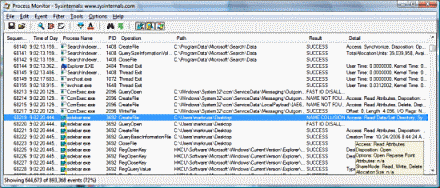
Process Monitor screenshot

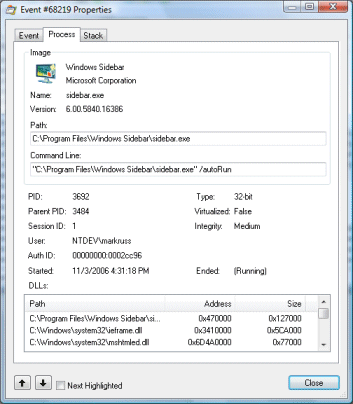
Event Properties screenshot


Third: how do I transfer files?

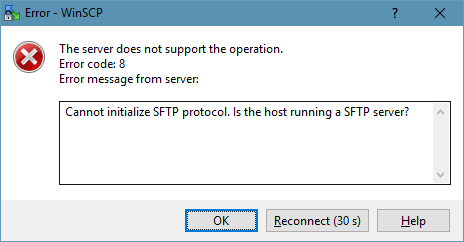
  • You don’t. Actually, you do, through SFTP. Midnight Commander was able to connect. For some reason, WinSCP is throwing an error message.
    • By default, the Microsoft SSH server does not run runs SFTP. I guess it can be enabled somehow, sincethe Windows 10 Mobile also includes SFTP server. There are definitely SFTP registry entries that the SSH broker tries to access. Some of them modify permissions, much like permissions for regular FTP.

Microsoft SFTP serverMicrosoft SFTP server

Is it better than the OpenSSH for Windows?

I think not:

  1. it has obviously a very special purpose and it’s clearly not intended for an ordinary user
  2. the configuration options are very limited and most of them is inaccessible (you need to modify ownership and permissions on the registry keys). Obviously, you can have a list of possible login options, so you don’t have to allow password login.

On the other hand,

  1. the cmd.exe kinda doesn’t work correctly in the OpenSSH server (you’ll terribly miss arrows and Tab, for instance)
  2. one interesting thing, and I should maybe add -

!! A word of caution !!

OpenSSH for Windows will not respect the UAC! When you log in under an administrator account, you can even delete system files and the apps will run with the maximum rights that your user theoretically has!

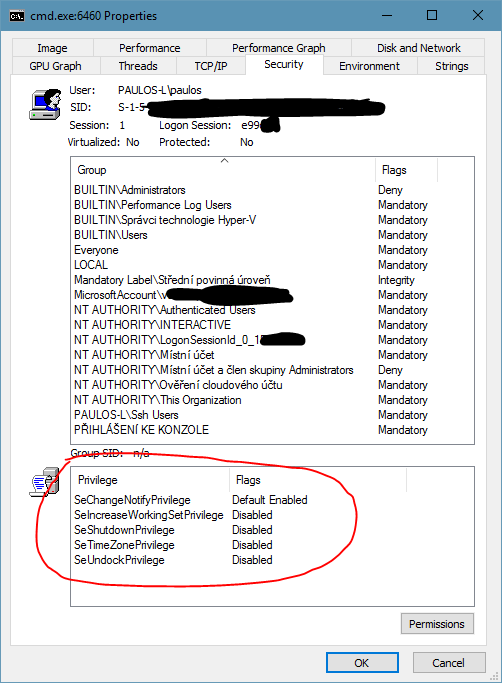
Using OpenSSH for Windows, you can run non-interactive command-line apps and get output from them, and you can also try to run apps with UI. These will run, but without any window or anything shown on the screen! I found it interesting that even my account did not have access to the processes running under my account! And yet, these apps running under sshd had all the privileges any hacker could wish for. Let’s show a couple of shots:

First, procexp without any special rightsFirst, procexp without any special rights

Then, procexp run under administratorThen, procexp run under administrator

Inspecting a regular process under my account (with UAC)Inspecting a regular process under my account (with UAC)
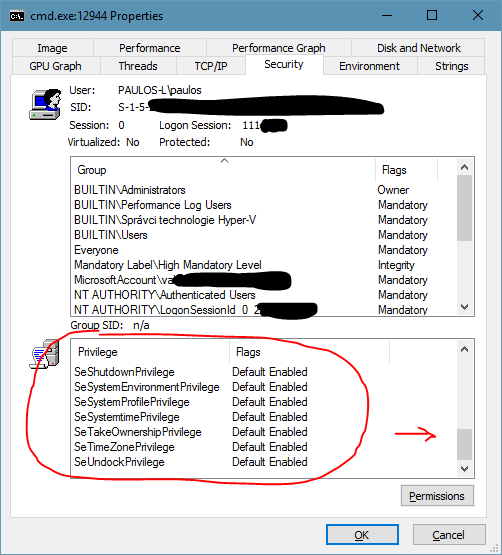
Inspecting a process running under sshd, with a looooot of rightsInspecting a process running under sshd, with a looooot of rights

But, also, because this is OpenSSH, you have a lot more options to protect your account, for example with a keyfile, and disable password logon as an example. (So many articles have been written about the correct settings, but I’m not posting it since I haven’t tried it yet.) So, be careful, but definitely experiment, you’ll never know where it leads you!

Can I run Bash on OpenSSH for Win?
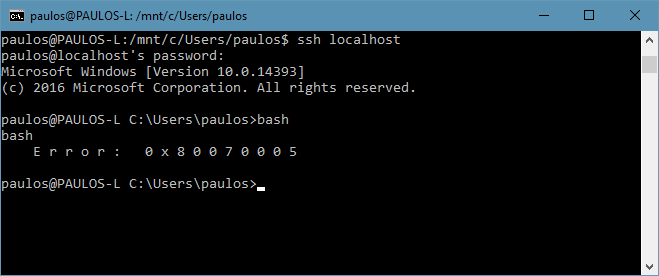
Definitely not under admin :)Definitely not under admin :)

But… I have been able to run Bash under the DevToolsUser!

I can run more tests if there’s a demand, just write below!

Cheers!

SSH Client

· Please ensure you are using up to date SSH clients. Same for any development or deployment tools using SSH. Latest Crypto should be supported like Elliptic curves or Chacha20.

For Windows users

o with Putty, current version is 0.70

o mRemoteNG current is v1.75.7011

o Tutty ssh client is not maintained and should NOT be used

o SecureCRT (commercial) is 8.1.4

For Mac users, command line openssh should be fine if latest Apple updates are done correctly (OpenSSH 7.4 on Macos 10.12.6)

· You SHOULD use SSH Protocol 2. v1 is deprecated and vulnerable.

o Open PuTTY. On the left side, go to Connection->SSH. Select “2 only.” On the left side, select Session (at the top). Highlight “Default Settings.” Click Save.

· Tunneling and ports forwarding will be disabled by default and explicit group assignment will be necessary to add them.

SSH key best practices

We recommend you to use ssh key. Password access will probably be disabled in coming year.

· If your key is years old, please regenerate one.

· Always use a passphrase on your ssh key. Only exception is automation keys.

· Use a password manager to store your passphrase

· Depending on type of key, enforce minimum bits. for RSA, it should be 2048 bits at minimum. Do not use DSA (deprecated since Aug 2015)

· Comment should include username (from ActiveDirectory), hostname and date of where/when key is created. Format should be "user@host-date". This is especially important for generic/automated account keys. Security team is monitoring ssh key usage and should be able to identify team owner quickly else access might be disabled.

· Automation keys should be use with a command restriction on the server meaning key can only be used for a specific command like rsync. Ideally, it is also restricted by subnet.

· Try to use different key per sensitivity level if not per host. For example, one usual key and another for finance servers.

· Never share your private key! Normally, it should never move or copy from its origin system. Just create a new one if needed.

On Windows

Use puttygen to generate key. As said above, if using RSA key type, ensure minimum bit size of 2048.


On MacOS/Unix
$ ssh-keygen -t rsa -b 2048 -C $USER@`hostname -s`-`date "+%Y%m%d"`
Generating public/private rsa key pair.
Enter file in which to save the key (/Users/myusername/.ssh/id_rsa):
Enter passphrase (empty for no passphrase): 
Enter same passphrase again: 
Your identification has been saved in /Users/myusername/.ssh/id_rsa.
Your public key has been saved in /Users/myusername/.ssh/id_rsa.pub.
The key fingerprint is: SHA256:ZVmKSDUJwb9JPxz54LwCkoH+TlYcTBeVP7efr6cOFus myusername@myhostname-20170912
The key's randomart image is:
+---[RSA 2048]----+
|     .=+=+...    |
|     +.o.o.+     |
|   .  +.. =o     |
|  . .. .oo+ o .  |
| .   oo.SB +.o . |
|  . o.. o * .o.  |
|   .o. .   o+  ..|
|   o.   . .o . .o|
|   ..    .  E.++o|
+----[SHA256]-----+
$ ssh-keygen -t ed25519 -C $USER@`hostname -s`-`date "+%Y%m%d"` -f ~/.ssh/id_ed25519-test
Generating public/private ed25519 key pair.
Enter passphrase (empty for no passphrase): 
Enter same passphrase again: 
Your identification has been saved in /Users/myusername/.ssh/id_ed25519-test.
Your public key has been saved in /Users/myusername/.ssh/id_ed25519-test.pub.
The key fingerprint is: SHA256:bO4cp3dpyb3ISua3V0HEg5viq025r4aXPb3ZjfKXq5s myusername@myhostname-20170912
The key's randomart image is:
+--[ED25519 256]--+
|              +. |
|             . + |
|              + .|
|       .   . o . |
|        S . .   .|
|       o   ..   .|
|        o =+++...|
|       o O+*X+++=|
|        +o*O*EB*=|
+----[SHA256]-----+

You can copy the key to your server with the following command

ssh-copy-id -i ~/.ssh/mykey user@host


Usage

· Use ssh-agent or putty-agent to avoid typing your passphrase too often

$ ssh-agent 
$ ssh-add ~/.ssh/id_rsa
Enter passphrase for /Users/myusername/.ssh/id_rsa: 
Identity added: /Users/myusername/.ssh/id_rsa (/Users/myusername/.ssh/id_rsa)
$ ssh host

· Use ProxyJump option for Bastion / Jump host. ProxyJump allows jumphost chaining if needed. ProxyJump requires OpenSSH 7.3+ else use ProxyCommand

$ cat ~/.ssh/config 
Host mytarget
   Hostname target_fqdn_or_IP
   User target_user
   ProxyJump jumpuser1@jumphost1

· If using Keepass password manager, you can integrate ssh key and passphrase inside of it with KeeAgent plugin.

· It's recommended to unload ssh keys before putting system on sleep. Same is also valid for Password Managers.

o On Windows, you can use a scheduled task linked to EventID 1074

o On Macos, you can use sleepwatcher and ssh-add -D

2 comments:

  1. Ssh Usage And Best Practices ~ System Admin Stuff >>>>> Download Now

    >>>>> Download Full

    Ssh Usage And Best Practices ~ System Admin Stuff >>>>> Download LINK

    >>>>> Download Now

    Ssh Usage And Best Practices ~ System Admin Stuff >>>>> Download Full

    >>>>> Download LINK sk

    ReplyDelete
  2. These platforms typically have user-friendly Which Cam Software is used in industries interfaces that make it easy for writers to create and publish their content.

    ReplyDelete

About

Privacy Policy

ShortNewsWeb

Blog Archive

Categories

10 Shows Like 'The Last of Us' You Should Watch Next (1) 11 of the Best Tech Gifts for Teens Still on Sale After Cyber Monday (1) 21 of the Weirdest Things You Can Bring on an Airplane (1) A Four Pack of These TSA-Approved Luggage SmartLocks Is on Sale $80 Right Now (1) After 90 Days on a Vibration Plate (1) and Artists Love It (1) and Here's the Gear That Made My Apartment Into a Video Studio on a Budget (1) and Here's What I Love (and Hate) About Walking Pads (1) and I Can't Recommend the Kindle Colorsoft (1) and It’s 30% Off for Memorial Day (1) and It's Half Off for Prime Day (1) and More (1) and Peloton’s Stretching Classes Are a Huge Help (1) and These Are 30% Off for Prime Day (1) and These Are the Top 10 Tech Sales This Week (3) and This Is My Favorite Stair Stepper Workout (1) and You Should Turn It Off (1) Android 16 Is Now Officially Available on These Devices (1) Android 16 Just Put Parental Controls Directly on Your Kid's Phone (1) Android 16's Latest Beta Adds a Long-Awaited Lock Screen Feature (1) Android's Canary Channel Lets You Try New Features Before Anyone Else (1) Apple Has Improved the Powerbeats Pro 2's Heart Rate Issues (but It’s Still Not Enough) (1) Apple Is Working On These Five New Satellite Features for the iPhone (1) Apple Just Added Two More Apple Music Features to iOS 26 (1) Apple's Newest iPhone Charger Is Pricey but Versatile (1) Apple’s Second macOS Tahoe Beta Lets You Test Out New AirPods Features (1) Are ‘Ultra-Processed’ Foods Really That Bad for You? (1) Are Brain Wearables the Future of Fitness Tracking? (1) but I Doubt They'll Be Able to Compete With Whoop's App (1) but My Brain Feels Amazing (1) Despite Google's Battery Performance Update (1) Disney Might Pull Its Channels From YouTube TV (1) Disney Movies Are Disappearing From YouTube and Google TV (1) E-Readers (1) Eight Apps I Use to Get a Ton of Free Stuff (1) Every Apple iPad Is on Sale for Labor Day (1) Everything You Need to Know About October Prime Day (1) Four Tools You Can Use to Find Any Leak in Your Home (1) Google Maps Will Soon Let You Talk to Gemini While Driving (1) Google's AI Mode Can Now Work Like a Virtual Sales Associate (1) Google's August 2025 Update Fixes These Issues With Your Pixel (1) Google’s First Foldable Phone Is Down to $580 for Labor Day (1) Google's Going All In on 'AI Mode' With New Features and a Global Launch (1) Here’s What to Expect From Walmart’s Black Friday and Cyber Monday Sales (1) How Apple Fixed the Photos App in iOS 26 (1) How I Feel After 30 Days With the Hydrow Arc Rower (1) How Insurance Companies Use Drones to Raise Your Rates (and What to Do About It) (1) How to Estimate the Utility Bills for Your New Home (1) How to Sign Up to Test Oura’s New Blood Pressure Feature (1) How to Speak With a Real Person at Target Customer Service (1) How to Turn Off the New ‘Gemini in Chrome’ Button (1) How to Watch Pornhub Even If It's Blocked In Your State (1) I Asked People the Real Reasons They Post Their Workouts Online (1) I Like Peloton's Mindful 'Reflection Rides' More Than I Thought I Would (1) I Love This Minimalist Smart Lock (1) I Swapped My Massage Gun for This Chirp Roller and My Muscles Have Never Felt Better (1) I Tested AI 'Humanizers' to See How Well They Actually Disguise AI Writing (1) I'm a Comics Reader (1) I'm a Deals Writer (3) I'm a Full-Time Creator (1) I’m a Marathon Runner (2) I’m Learning to Do the Splits As an Adult (1) If You Hate Running (1) iOS 26 Will Make Managing Your Battery Life Easier (1) My 10 Favorite YouTube Channels for At-Home Yoga Classes (1) My Favorite Amazon Deal of the Day: Samsung Galaxy Buds 3 FE + Galaxy SmartTag 2 (1) My Favorite Amazon Deal of the Day: Shokz OpenRun Headphones (1) My Favorite Amazon Deal of the Day: The 2024 Kindle (1) My Favorite Amazon Deal of the Day: The 75-Inch Amazon Fire TV Omni QLED (1) My Favorite Amazon Deal of the Day: The Nothing CMF Watch 3 Pro (1) My Favorite Amazon Deal of the Day: The Samsung Galaxy S25 FE With a $100 Gift Card (1) My Favorite Amazon Deal of the Day: The Sonos Roam 2 Portable Speaker (1) My Favorite Amazon Deal of the Day: This 75-inch Toshiba C350 Smart TV (1) My Favorite Amazon Deal of the Day: This 85-Inch TCL QLED TV (1) My Favorite Amazon Deal of the Day: This Like-New Amazon Kindle Paperwhite (1) My Favorite Underrated Fitness Watch Is Less Than $200 Until Prime Day Ends Tonight (1) My Legs Feel the Same (1) Nine Useful Power Tools You Probably Didn’t Know Existed (1) NYT Games Subscribers Can Now Make Custom Wordles for Their Friends (1) October Prime Day 2025: Live Updates on the Best Deals for MacBooks (1) OpenAI Will Now Operate Like a For-Profit Company (1) Peloton's 'Pace Targets' Workouts May Turn Me Into a Runner (1) Peloton's Nutrition Offerings Are Surprisingly Robust (and Free) (1) Samsung’s Next Galaxy Unpacked Will Reveal Its ‘Ultra’ Foldable (1) Samsung's Ultrawide Odyssey G9 Monitors Are Down to Their Lowest Prices Ever for Labor Day (1) Six New Ways to Customize Your Mac’s Look in macOS Tahoe (1) Six of the Best Indoor Air Quality Monitors for Your Home (1) Six of the Best YouTube Channels for Running Workouts (1) Six Tricks Companies Use to Hide the Impact of Tariffs (1) Smart Glasses (1) Sony Will Soon Let You Pair Your PS5 Controller With Multiple Devices at Once (1) Sony's DualSense PS5 Controllers Are on Sale for Black Friday (1) T-Mobile's App Is Recording Your Screen by Default (1) Target’s ‘Circle Week’ Sale Will Start Before Amazon’s October Prime Day (1) The 11-Inch M4 iPad Pro Is $500 Off for Prime Day (1) The AirPods 4 Are on Sale for $90 During Labor Day (1) The AirPods 4 Are Still at Their Prime Day Price (1) The Apple Watch SE 2 Is $80 Off Right Now (1) The Apple Watch’s Newest Health Feature Has Been Cleared by the FDA (1) The Beats Studio3 Are Just $89 Right Now (1) The Best Deals You Can Get on TVs Before Prime Day Ends Tonight (1) The Best iPad for Most People Is on Sale for Its Lowest Price Ever (1) The Best Labor Day Tool Deals Under $25 (1) The Best Prime Day Deals on Headphones (1) The Best Sales on Headphones and Earbuds Right Now (1) The Best Study Apps That Make Learning Easier (1) The Cheapest Apple Watch Is an Even Better Deal on the Last Day of Prime Day (1) The Google Pixel Watch 2 Is 20% Off Right Now (1) The Latest M4 MacBook Air Is Down to Its Lowest Price Ever for Labor Day (1) The Les Mills ‘Educational’ Fitness Classes Helped Me Understand Why My Favorite Workouts Work (1) The Meta Quest 3S VR Headset Just Dropped To Its Lowest Price Ever On Amazon (1) The PlayStation Portal Is Cheaper Than Ever Ahead of Black Friday (1) The Two Best Streaming Services for Movie Nerds Are Discounted for Black Friday (1) The Utilities Questions No One Thinks to Ask Before Buying a House (1) The XP-Pen Magic Note Pad Is $140 Off for This Early Black Friday Deal (1) There's Something Off About Apple's New Sleep Score (1) These Are the Best Flashcard Apps for Studying (1) These Are the Best Labor Day Tech Deals on Amazon (1) These M4-Powered MacBook Pros Are All at Their Lowest Prices Ever Right Now (1) This App Switcher for Mac Is Way Faster Than Command-Tab (1) This Is the Best AirPods Pro Deal Ahead of Black Friday (1) This JBL Outdoor Speaker Is $130 Off Ahead of Prime Day (1) This Orbital Massage Gun Is Now Essential to My Workout Routine (1) This Pixel Still Caught Fire (1) This Popular 55-Inch Hisense TV Is 45% Off Ahead of Prime Day (1) This Quirky Wallet-Sized E-Reader Is Under $50 for Cyber Monday (1) This Sleep Number Bed Has Been Giving Me the Best Rest (1) This Sonos Soundbar Is $150 Off for Black Friday (1) Three Whoop Band Competitors Are Coming (1) Try 'Rucking' (1) Use the SQ3R Method to Study More Effectively (1) Use This App to Add Windows-Style Auto Scrolling to macOS (1) Vine Is Back (1) What It's Like to Race With the Garmin Forerunner 165 (1) What You Should Actually Know About Tylenol and Pregnancy (1) Which Apple Announcements to Expect From WWDC 2025 (1) Why I Always Check the Wet Bulb Temperature Before a Summer Run (1) Why You Need to Update Your Plex Server ASAP (1) Yes (1) You Can Get $150 Off an 11-inch iPad Air for Labor Day (1) You Can Get $350 Off the Galaxy S25 Ultra for Prime Day (1) You Can Get the Apple Watch Ultra 2 at Its Lowest Price Ever During Prime Day (1) You Can Get This Microsoft Surface Laptop SE on Sale for $190 Right Now (1) You Can Now Buy These Massage Guns With Your FSA or HSA (1) You Need Adjustable Dumbbells in Your Life (1) Your iPhone's Camera Comes With a Hidden Translator (1) Your Webcam and Phone Camera Can Be Hacked (1) YouTuber Hank Green’s Focus App Just Overtook ChatGPT on the App Store (1) 'The Woks of Life' Reminded Me to Cook With All the Flavors I Love (1) 10 Scary Podcasts to Listen to in the Dark (1) 11 Ways to Automate Your Life (and Get Back More Free Time) (1) 13 of the Best Spooky Episodes From (Mostly) Un-Spooky Shows (1) 13 Spooky Movies Set on Halloween Night (1) 16 of the Best Ways to Declutter Your Home (1) 1Password Now Generates QR Codes to Share Wifi Passwords (1) 2024 (15) 21 Thanksgiving Movies About Families As Screwed-Up As Yours (1) 30 Movies and TV Shows That Are Basically 'Competence Porn' (1) 30 of the Most Obscenely Patriotic Movies Ever (1) 31 Spooky Movies to Watch Throughout October (1) 38 of the Best Queer Movies of the Past 100 Years (1) 40 Netflix Original Series You Should Watch (1) 55 Box Office Bombs Totally Worth Watching (1) Active Directory (1) Adobe's AI Video Generator Might Be as Good as OpenAI's (1) AIX (1) Amazon Prime Members Can Get Two Free E-Books in May (1) Amazon's Biggest Kindle Is $75 Off Right Now (1) and I'd Do It Again (1) and It's Not Worth the Price Hike (1) and Max Bundle Isn't a Terrible Deal (1) and the Dreo Solaris Is the Best Space Heater I’ve Tried (1) and These Are My Favorite Tech Deals From Walmart’s Black Friday Sale (1) and These Water-Resistant Running Shoes Are a Game Changer (1) and They're All on Sale for Black Friday (1) Apache (2) Apple Finally Made the New AirPods Max Worth Buying (1) Apple Intelligence Is Running Late (1) Apple Intelligence's Instructions Reveal How Apple Is Directing Its New AI (1) Apple Passwords Is Now on Firefox (but Not for Windows Users) (1) Apple's Latest Update Might Have Opted You Back Into Apple Intelligence (1) Apple’s Password Manager Had a Major Security Flaw (1) August 18 (1) August 4 (1) August 5 (1) Avoid an Allergic Reaction by Testing Your Halloween Makeup Now (1) Backup & Restore (2) best practices (1) bleepingcomputer (217) Blink Security Cameras Are up to 68% Off Ahead of Prime Day (1) Bluesky Has Trending Topics Now (But You Can Disable Them) (1) CentOS (1) CES 2025: Asus' Zenbook A14 Is the Lightweight Laptop My Back Wishes I Had (1) CES 2025: Govee’s New Pixel Light Will Remind You of a Lite Brite (1) ChatGPT Now Has a 'Library' of Your AI-Generated Images (1) Configure PowerPath on Solaris (1) Congress Might Ban DeepSeek (1) Documents (2) Don't Buy the New iPad Air (1) Don't Fall for This 'New' Google AI Scam (1) Don't Rely on a 'Monte Carlo' Retirement Analysis (1) Eight Cleaning Products TikTok Absolutely Loves (1) Eight Landscaping Features That Can Lower the Summer Heat in Your Yard (1) Eight of the Best Methods for Studying so You Actually Retain the Information (1) Eight Unexpected Ways a Restaurant Can Mislead You (1) Elevate Your Boring Store-Bought Pretzels With This Simple Seasoning Technique (1) Even Grok AI Can 'See' Now (1) Even Steam Has Malware Now (1) Everything Announced at Apple's iPhone 16 Event (1) Everything I'm Seeding in February (1) file system (6) Finally (1) Find (1) Find a Nearby ‘Gleaning Market’ to Save Money on Groceries (1) Five Red Flags to Look for in Any Restaurant (1) Five Ways to Keep Your Neighbors From Looking Down Into Your Yard (1) Five Ways You Can Lose Your Social Security Benefits (1) Flappy Bird's Creator Has Nothing to Do With Its 'Remake' (1) For Years (1) Four Reasons to Walk Out of a Job Interview (1) Four Signs Thieves Are Casing Your House (1) gaming (1) Gboard for Android Finally Gets Undo (1) Goldfish Crackers Have a New Name (for a Little While) (1) Google Might Be Removing the 'I'm Feeling Lucky' Button (1) Grok Is Now Available Without an X Account (1) Hackers Now Have Access to 10 Billion Stolen Passwords (1) Hackers Stole Health Records From 1.6 Million Planned Parenthood Patients (1) Here’s Everything You Get With Garmin’s New Connect+ Subscription (1) Here's What's New in the Latest Nintendo Switch Update (1) Here’s Why (and When) Gemini Is Replacing Google Assistant (1) How I Finally Organized My Closet With a Digital Inventory System (1) How I Pack Up a Hotel Room So I Don’t Forget Anything (1) How Opening Multiple Bank Accounts Helped Me Manage My Money Better (1) How to Buy Residency in Another Country With a 'Golden Visa' (1) How to Cancel Your Amazon Prime Membership After Prime Day Is Over (1) How to Choose the Best Weightlifting Straps for Your Workout (1) How to Do Fartlek Runs (and Seven Different Kinds to Try) (1) How to Enable (and Turn Off) Apple Intelligence on an iPhone (1) How to Get Free Car Maintenance and Repair Work (1) How to Get Started With Bluesky (1) How to Keep Squirrels Off Your Bird Feeders (1) How to Mute Words and Phrases on Your Bluesky Feed (1) How to Protect Your Kids From Identity Theft (1) How to Remotely Control Another iPhone or Mac Using FaceTime (1) How to Set Up Your Bedroom Like a Hotel Room (and Why You Should) (1) How to Speak With a Real Person at Target Customer Service (1) How to Stock a 'Tariff Pantry' (1) How to Take a Screenshot on a Mac (1) How to Take Full Control of Your Notifications on a Chromebook (1) How to Track When Nintendo Switch 2 Preorders Are Back in Stock (1) How to Track Your 2024 Federal Tax Refund (1) How to Use Lighting to Improve Your Home's Sale Price (1) How to Use Picture-in-Picture Mode on an Android Phone (1) How to Write SMART Goals That Actually Help You Reach Your Fitness Dreams (1) Hulu (1) I Chose the Beats Fit Pro Over the AirPods Pro (1) I Tested Grok 3 (1) I'd Recommend These Seven Outdoor Security Cameras I've Tested (1) I'm a Runner (1) I'm a Shopping Writer (1) I’m Always Cold (1) If You Got a Package You Didn't Order (1) If You Hate Running (1) If You Want Lossless Audio on Your AirPods Max (1) Important Questions (17) Instagram Is Using AI to Automatically Enroll Minors Into 'Teen Accounts' (1) Install and Configure PowerPath (1) interview questions for linux (2) Is ‘Ultra-Processed’ Food Really That Bad for You? (1) Is Amazon Prime Really Worth It? (1) It Might Be a Scam (1) It's Surprisingly Easy to Customize Your Mac's Folder Icons (1) July 14 (1) July 21 (1) July 28 (1) July 7 (1) June 30 (1) Lifehacker (24) LifeHacker (369) Linux (36) Make and Freeze Some Roux Now for Easy Turkey Gravy (1) Meredith's Training Diaries: How I Crushed My Marathon Personal Record (1) Meta Releases Largest Open-Source AI Model Yet (1) Monitoring (3) music (688) My Favorite 14TB Hard Drive Is 25% Off Right Now (1) My Favorite Amazon Deal of the Day: Apple AirPods Max (2) My Favorite Amazon Deal of the Day: Apple Pencil Pro (1) My Favorite Amazon Deal of the Day: Galaxy S25 Edge Preorders (1) My Favorite Amazon Deal of the Day: Google Nest Mesh WiFi Router (1) My Favorite Amazon Deal of the Day: Google Pixel 8 (1) My Favorite Amazon Deal of the Day: PlayStation 5 (1) My Favorite Amazon Deal of the Day: Samsung Odyssey G9 Gaming Monitor (1) My Favorite Amazon Deal of the Day: SHOKZ OpenMove Bone Conduction Headphones (1) My Favorite Amazon Deal of the Day: The 13-Inch M3 Apple MacBook Air (1) My Favorite Amazon Deal of the Day: The Beats Pill Portable Speaker (1) My Favorite Amazon Deal of the Day: The Garmin Forerunner 955 (1) My Favorite Amazon Deal of the Day: The Garmin Venu 3S (1) My Favorite Amazon Deal of the Day: The Google Nest Learning Thermostat (1) My Favorite Amazon Deal of the Day: The Google Pixel 9 Pro (1) My Favorite Amazon Deal of the Day: The Google TV Streamer 4K (1) My Favorite Amazon Deal of the Day: The Kindle Colorsoft Signature Edition (1) My Favorite Amazon Deal of the Day: The M4 MacBook Air (1) My Favorite Amazon Deal of the Day: The Microsoft Surface Pro (1) My Favorite Amazon Deal of the Day: The Samsung Galaxy Buds 3 Pro (1) My Favorite Amazon Deal of the Day: The Sonos Era 100 (1) My Favorite Amazon Deal of the Day: These Bose QuietComfort Headphones (1) My Favorite Amazon Deal of the Day: This Meta Quest 3S Bundle (1) My Favorite Bone-Conduction Headphones Just Dropped to Their Lowest Price (1) My Favorite Fitness Watch Is Getting Walking Workouts and a Smart Alarm (1) My Favorite Tools for Managing Cords and Cables (1) Nagios (2) Netflix Is Changing Its TV App Design (1) Newtorking (1) NFS (1) Now Is a Good Time to Buy a Refurbished M-Series MacBook (1) OMG! Ubuntu! (688) OpenAI Just Introduced More Ways to Use ChatGPT on WhatsApp (1) Opera’s New Browser Is Built to Break Your Doomscrolling Habit (1) Oracle Linux (1) oracleasm (3) osnews (58) Oura’s Readiness Score Finally Takes Menstrual Cycles Into Account (1) Password less communication (1) Patching (2) Pixel Studio Is the Easiest (If Not the Best) Way to Make AI Art on Your Pixel 9 (1) Poaching Is the Secret to Perfect Corn on the Cob (1) powerpath (1) Prioritize Your To-Do List By Imagining Rocks in a Jar (1) Red Hat Exam (1) Redo Buttons (1) register (230) Rsync (1) Safari’s ‘Distraction Control’ Will Help You Banish (Some) Pop Ups (1) Samba (1) Samsung Just Announced the Galaxy S25 Series (1) Save Time and Air Fry Your Pumpkin Pie (1) Scrcpy (1) Sending an Emoji in Google Messages Will Now Play a Fun Animation (1) September 1 (1) September 15 (1) September 2 (1) September 22 (1) September 23 (1) September 30 (1) September 8 (1) Seven Home 'Upgrades' That Aren’t Worth the Money (1) Seven Popular Home Renovations That Will Increase Your Property Taxes (1) Seven Things Your Credit Card’s Trip Protection Won’t Actually Cover (1) Seven Ways to Make Your Home's Entryway More Secure (1) Six Items That Will Maximize Your Carry-On Space (1) Six of the Most Common Tax Myths in 2025 (1) Six Signs Your Bank Is About to Fail (and What to Do About It) (1) Six Unexpected Household Uses for Dry-Erase Markers (1) Six Ways to Prevent a Contractor From Damaging Your House During a Renovation (1) ssh (1) Stop Your iPhone From Sharing Photos' Data With Apple (1) Swift Shift Is the Window Management Tool Apple Should Have Built (1) System hardening (1) Tailor Your iPhone's Fitness Summary to Your Workouts (1) Target’s ‘Circle Week’ Sale Is Still Going After October Prime Day (1) Target’s Answer to Prime Day Starts July 7 (1) Tech (9661) Tech CENTRAL (110) Technical stories (362) technpina (22) The 30 Best Movies of the 2020s so Far (and Where to Watch Them) (1) The 30 Best Sports Movies You Can Stream Right Now (1) The Apple Watch SE (2nd Gen) Is 27% Off Right Now (1) The Beats Solo 4 Are 50% Off Right Now (1) The Best Deals on Robot Vacuums for Amazon’s Early Prime Day Sale (2) The Best Deals on Ryobi Tools During Home Depot's Labor Day Sale (1) The Best Early Prime Day Sales on Power Tools (1) The Best Last-Minute Mother’s Day Gifts for Moms Who Like to Cook (1) The Best Last-Minute Valentine's Day Gift Ideas for Under $30 (1) The Best Movies and TV Shows to Watch on Netflix This Month (1) The Best October Prime Day Deals If You Are Experiencing Overwhelming Existential Dread (1) The Best Places to Go When You Don't Want to Be Around Kids (1) The Best Places to Order Thanksgiving Dinner to Go (1) The Best Strategies for Lowering Your Credit Card Interest Rate (1) The Best Way to Clean a Microwave (1) The Best Ways to Prevent Countertop Appliances From Damaging Your Kitchen (1) The Best Ways to Store All Your Bags and Purses (1) The Boox Note Air 4C Is a Color E-Reader and Digital Notebook in One (1) The Easiest Way to Free Up Disk Space on Your Mac (1) The Latest watchOS Beta Is Breaking Apple Watches (1) The Marshall Emberton II Speakers Are $70 Off for Black Friday (1) The New Disney+ (1) The Ninja Crispi Is Changing How I Make Party Dips (1) The PowerSchool Breach May Have Compromised Over 70 Million Users' Data (1) The Real Cost of Using a Nespresso Machine (1) The Samsung Galaxy Buds 3 Pro Are $60 Off for Black Friday (1) The Two Best Times of Year to Look for a New Job (1) the X Rival Everyone's Flocking To (1) There's a Fix for Apple Mail's Weird Archiving Behavior (1) These Anker Soundcore Sport X10 Earbuds Are Cheaper Than Ever (1) These Bissell Vacuums Are on Sale Ahead of Black Friday (and They're All Great) (1) These Dutch Ovens Are Less Than $70 Right Now (Including My Favorite One) (1) These Googly Eyes Will Help You Find Your Mac's Cursor (1) These Meatball Shots Are My Favorite Football Season Snack (1) These Milwaukee Tools Are up to 69% off Right Now (1) These Tech Products Are More Than Half Off During Amazon's Big Spring Sale (1) This 2024 Sony Bravia Mini-LED TV Is $400 Off Right Now (1) This 75-Inch Hisense ULED 4K TV Is $500 Off Right Now (1) This App Lets You Create Automations Your Mac Usually Doesn’t Support (1) This Google Nest Pro Is 30% Off for Prime Day (1) This Ikarao Portable Karaoke Machine Is More Than $100 Off (1) This iPhone and Mac App Lets You Edit Your Bluesky Posts (1) This MagSafe-Compatible Power Bank Is 40% Off for Black Friday (1) This Peanut Butter Latte Isn’t As Weird As It Sounds (1) This Safari Extension Gives You More Control Over Your Reddit Feed (1) This Tech Brand Will Get the Biggest Discounts During Prime Day (1) This TikTok Upholstery Cleaning Hack Actually Works (1) Three New Things We Know About the Nintendo Switch 2 (1) Three Quick Ways to Shorten a Necklace (1) Three Services People Don't Know They Can Get From Their Bank for Free (1) TikTok's '5x5' Cleaning Method Is Great If You're Short on Time (1) Today’s Wordle Hints (and Answer) for Monday (4) Today’s Wordle Hints (and Answer) for Sunday (11) Try 'Pile Cleaning' When Your Mess Is Overwhelming (1) Try 'Pomodoro 2.0' to Focus on Deep Work (1) Try 'Rucking' (1) Ubuntu News (361) Ubuntu! (1) Unix (1) Use the ‘Organizational Triangle’ to Keep Your House Neater (1) Use This App to Sync Apple Reminders With Your iPhone Calendar (1) Use This Extension to Find All Your X Followers on Bluesky (1) Use This Shortcut to Remove AI From Google Photos Search (1) Use TikTok's 'Rage Cleaning' Trend to Get Your Place Spotless (1) veritas (2) Videos (1) Warner Bros. Is Uploading Classic Movies to YouTube for Free (1) Was ChatGPT Really Starting Conversations With Users? (1) Watch Out for These Red Flags in a Realtor Contract (1) Wayfair Is Having a '72-Hour Closeout' Sale to Compete With Prime Day (1) We Now Know When Google Will Roll Out Android 15 (1) What Is a Healthy Resting Heart Rate? (1) What Is the 'Die With Zero' Movement (and Is It Right for You)? (1) What Not to Do When Training for a Marathon (1) What to Do When Your Employer Shifts Your Pay From Salary to Hourly (1) What to Look for (and Avoid) When Selecting a Pumpkin (1) What to Wear to Run in the Cold (1) What You Should Hoard Before Tariff Price Increases Kick In (1) What's New on Max in December 2024 (1) What's New on Netflix in March 2025 (1) What's New on Prime Video and Freevee in September 2024 (1) Where to Stream Every Nominated Movie Before the 2025 Oscars (1) Why Now Is the Best Time to Find Running Shoes on Sale (1) Why the Apple TV App Is Better on Android Than iPhone (1) Why You Can't Subscribe to Disney+ and Hulu Through Apple Anymore (1) Why You Might Want to Avoid the Latest Chromecast Update (1) Why You Need Cycling Shoes to Ride a Spin Bike (and How to Pick Some Out) (1) Why Your Home Gym Needs Adjustable Kettlebells (1) Windows (5) You Can Easily Add Words to Your Mac's Dictionary (1) You Can Fight (and Avoid) Your Landlord's Cleaning Fees (1) You Can Get 'World War Z' on Sale for $19 Right Now (1) You Can Get a Membership to BJ's for Practically Free Right Now (1) You Can Get Beats Studio Buds+ on Sale for $100 Right Now (1) You Can Get Microsoft Visio 2021 Pro on Sale for $20 Right Now (1) You Can Get This 12-Port USB-C Hub on Sale for $90 Right Now (1) You Can Get This Roomba E5 Robot Vacuum on Sale for $170 Right Now (1) You Can Hire Your Own Personal HR Department (1) You Can Now Make Google Messages Blur NSFW Images (1) You Can Search Through Your ChatGPT Conversation History Now (1) You Can Set Different Scrolling Directions for Your Mac’s Mouse and Trackpad (1) You Don't Need to Panic Over the Latest Steam 'Leak' (1) You Need Beneficiaries for More Accounts Than You Think (1) You’re Probably Going to Need Another Dongle (1) Your DeepSeek Chats May Have Been Exposed Online (1) Your Verizon Bill Just Got a Little More Expensive (1)

Recent Comments

Popular Posts

Translate

My Blog List

Popular

System Admin Share

Total Pageviews