Tuesday, 8 June 2021

No matter how powerful or stylish, quiet or compact, your PC is, without a good keyboard you simply won't enjoy using it. As one of the pieces of hardware you spend the most time interacting with, it is absolutely crucial to get a keyboard that matches your requirements.

And everyone is different in that regard. But the keyboard makers are equal to this, and there is a mind-boggling selection out there today. Whatever your budget, whether it's for office work or gaming, packing in a bag to use with a laptop or coding, whatever your reasons to type on a keyboard there is something out there for you.

Best keyboards at a glance

  1. Logitech K860The best keyboard: Ergonomically designed, exceptionally well built, affordable and with terrific battery life.
  2. Razer Huntsman V2 AnalogThe best mechanical keyboard: Aimed at gamers, but this keyboard is truly breathtaking with adjustable actuation, optical switches, low noise and so much more
  3. Microsoft Designer Compact KeyboardBest Bluetooth keyboard: Minimalist design, superb quality and multi-device support
  4. Razer Pro TypeBest keyboard for the office: A blend of gaming and ergonomics has resulted in a truly spectacular professional keyboard
  5. Microsoft Ergonomic KeyboardBest ergonomic keyboard: Comfortable, affordable and will look after your wrists while you type
  6. SteelSeries Apex ProBest keyboard for heavy gaming: Customizable actuation on every key, a great build and stellar performance
  7. Razer BlackWidow V3 MiniBest compact keyboard: A 65% design, exquisite construction, and a choice of Razer mechanical keys
  8. KLIM LightningBest budget keyboard: A semi-mechanical keyboard with absurdly good build quality and an almost unbelievable price

What is the best keyboard?

PC builders especially can get easily carried away with the bits that go inside their rig, but as much focus should be spent on what you're using outside it. Whether you're working or playing, you'll spend most of your time typing something and a bad keyboard will ruin your experience.

Best keyboards in 2021

Equally, choosing a keyboard isn't the easiest thing to do. There are so many different types to consider, where do you begin? There are a few areas that you can narrow down before you start shopping. Consider your budget first and foremost, and then what it is you're mainly looking to do. Gaming keyboards are going to be very different from a slim, Bluetooth keyboard you can pop in your laptop bag, for example.

The best of the best is Razer's new Huntsman V2 Analog, with a list of features as long as your arm, and it's not just a good gaming keyboard. Alternatively, the Razer Pro Type uses some of the same ideas but refocuses on the office and ergonomics. Microsoft is a big player, too, with both a fantastic Bluetooth and ergonomic keyboard.

We spend a lot of time testing keyboards so you don't have to, and this is the best you can buy right now.

1. Logitech K860: The best keyboard for most PC users

Bottom line: Offering amazing comfort and support while typing, the Logitech Ergo K860 is a fantastic choice for combating pain in your hands and arms.

Manufacturer Version Vendor
Logitech K860 $130 at Amazon
Logitech K860 $130 at Best Buy

Pros

  • Amazing comfort and support
  • Durable design
  • Extreme battery life
  • Flexibility of wireless connection
  • Attractive price

Cons

  • No backlighting
  • Wrist rest can't be removed

The bulk of people buying a keyboard for their PC don't want some flashy, ultra-expensive, feature-packed box of tricks. Instead, they're looking for a good, comfortable typing experience and a quality product that will stand the test of time. That is exactly what you find with the Logitech K860 ergonomic keyboard.

If you run down a list of things that make a good home or office keyboard, you'll find them all here. It's well built and extremely durable, it has no wires, you get a built-in wrist rest, great typing experience and, importantly, an attractive price. It isn't perfect, for example, there's no backlighting and the wrist rest can't be removed, but the good far outweighs the bad.

Ergonomic keyboards are hardly a new idea, but the K860 expands upon the idea with a radical design that raises the whole keyboard in the middle. In turn, this odd position does bring with it a bit of a learning curve, but once you get the hang of it, you'll be all the better off. Your wrists and hands will be more comfortable, and fatigue will be kept at bay.

Wireless keyboards make for a tidy environment, but there's always the thought at the back of the mind about battery life. That isn't an issue with the K860, with truly outstanding longevity. This is a keyboard that isn't fancy or flashy, but it does what a keyboard needs to do better than the competition.

Logitech K860

Not flashy or packing a stacked feature list, the K860 instead concentrates on being a great keyboard that's comfortable to type on and that will help you look after your wrists. And it achieves that in spades.

$130 at Amazon

$130 at Best Buy


Getting the right keyboard could be the difference between loving and hating using your PC. Along with the monitor, it's the thing you spend the most time interacting with. A bad typing experience makes for a bad day. But everyone is different, too, and has different preferences and, importantly, budget.

Spending a lot doesn't guarantee you'll enjoy using it.

Spending a lot on a keyboard doesn't automatically guarantee you'll enjoy using it. Likewise, if you never game, do you need to spring for a flashy mechanical keyboard with RGB and adjustable actuation? Probably not. This is why you should always know exactly what you're looking for before making your decision.

One part of buying a keyboard for a PC is easy, though. The overwhelming majority out there will be not only compatible but designed for Windows. Dedicated keys to access Windows features are common, including media, app shortcuts, even emoji, now.

The hardest part is narrowing it down. There are so many keyboards to choose from that it's hard to know where to start. That's why we've tested a whole lot of today's options to help you choose the best of the best.


2. Razer Huntsman V2 Analog: The top mechanical keyboard you can buy right now

Bottom line: It's pricey, but worth every penny. The Huntsman V2 Analog is an extraordinary thing, ticking more boxes for a keyboard than anything else we've ever tested.

Manufacturer Version Vendor
Razer Huntsman V2 Analog $250 at Razer

Pros:

  • Adjustable actuation points on per-key basis
  • Analog optical switches are light and quiet
  • USB-C connection
  • Much improved wrist rest included
  • Controller-like function for keys
  • USB 3.0 pass-through

Cons:

  • Pricey
  • Quite chunky and heavy

If you're shopping on a tight budget, the Razer Huntsman V2 Analog is not going to be your choice. It's expensive. It's also one of the most technologically advanced keyboards on the market today, so there's no brand tax being applied. In fact, there's so much going on with the Huntsman V2 Analog it's hard to know where to begin. This is a keyboard unapologetically targeted at gamers, but they are far from the only people who will enjoy it.

The heart of this keyboard is Razer's newest switch. It's an optical, as on the previous generation Huntsman, but that's where the similarities end. The Analog Optical switch is linear, so it's smooth and has no bump action, and has adjustable actuation. Each key can be altered to a value between 1.5mm and 3.6mm. The lower you go the faster the keys. Not that you feel anything different, since there's no physical change to the keys.

The other big deal with the switches is the scaling input. For gaming, this is designed to offer an analog-feel that you might normally associate with a gamepad. You won't be using this for typing, but it could transform your gaming. Again, it's customizable on a key-by-key basis and since you can lock profiles into the onboard memory, you can use them on any PC, too.

The Huntsman V2 Analog is just a nice thing to live with, too. It hooks up over USB-C, has a USB-3.0 pass-through port and dedicated media keys along with a volume dial. The newly redesigned wrist rest is incredibly comfortable, and Razer made sure there's no frame on it anymore, just plush, soft padding and since it's attached with magnetic pins, it won't slide about either. Razer has been a pioneer in the keyboard industry for many years now, and to think we're now looking at something as remarkable as the Huntsman V2 Analog blows the mind.

Razer Huntsman V2 Analog
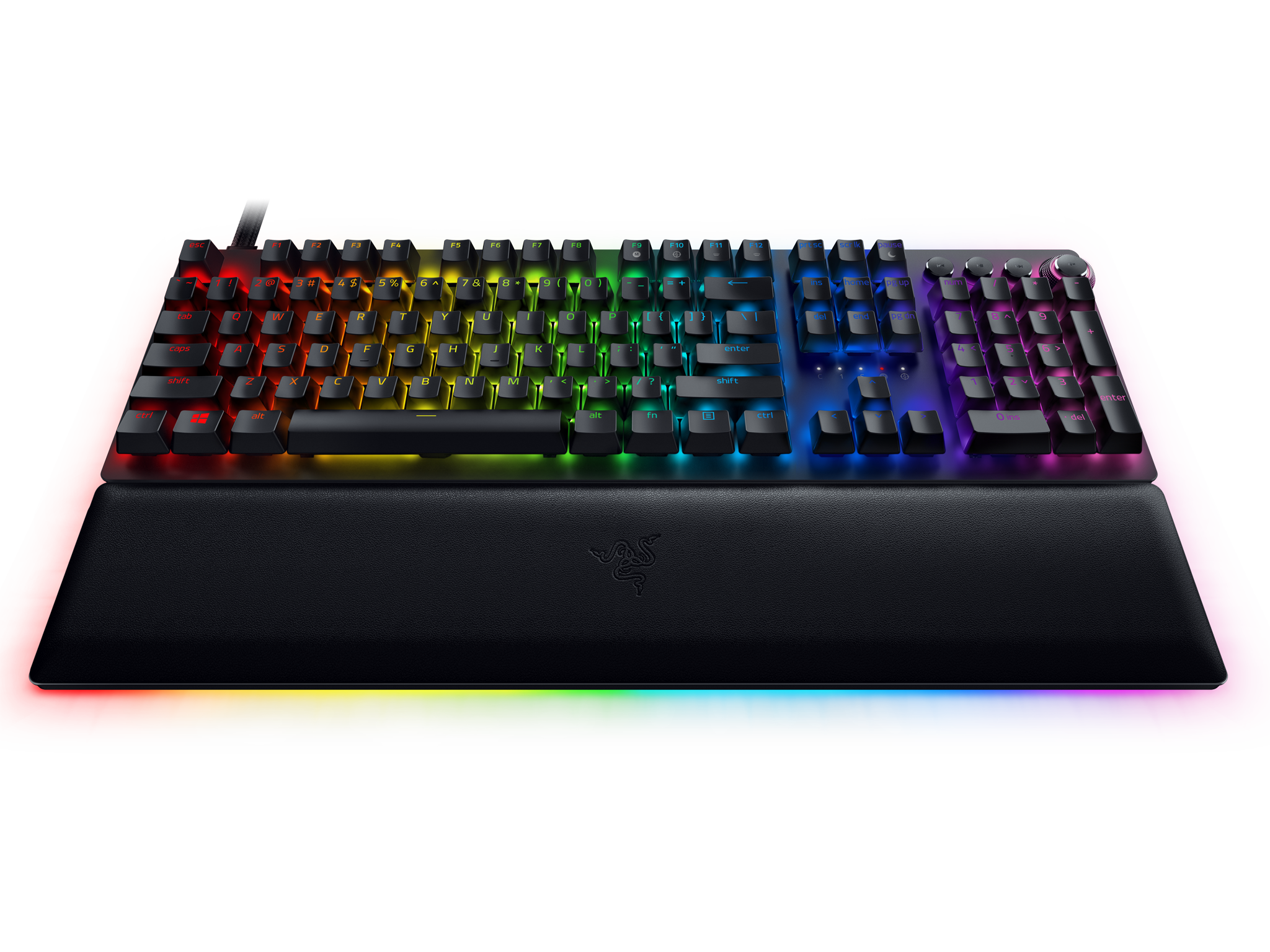
Razer's most ambitious keyboard to date is also its best by a clear margin. From the switches to the build quality and everything in between this is a simply staggering keyboard.

$250 at Razer


3. Microsoft Designer Compact Keyboard: The best Bluetooth keyboard for desktops and laptops

Bottom line: The Microsoft Designer Compact Keyboard is an excellent Bluetooth keyboard for minimalists, featuring a small footprint, a great typing experience and the ability to connect to multiple devices at once.

Manufacturer Version Vendor
Microsoft Designer Compact Keyboard $61 at Microsoft
Microsoft Designer Compact Keyboard $56 at Amazon

Pros:

  • Beautiful design
  • Customizable with the Keyboard and Mouse Center
  • Emoji key included
  • Multi-device support
  • Superb battery life

Cons:

  • No backlight
  • Plastic instead of metal
  • Only two colors

Large, chunky keyboards aren't for everyone, but slimming down doesn't have to mean compromising. That's exactly the case with the Microsoft Designer Compact Keyboard, which make look a little boring at first glance, but is anything but. For one, the styling is beautifully minimal, making it match perfectly with any setup on any desk. It would be nice to have a choice of more than just black or white, but the glamour here is in the simplicity.

The keys are chiclet style and have the sort of key travel you would expect to find on a laptop. As a result it's also extremely quiet and remarkably thin. It doesn't have a built-in battery or take regular batteries, instead using CR2032 for power to keep that profile so slim. Despite using watch-style batteries, you should be able to get up to three years before needing to swap. That alone is reason to buy.

Microsoft has also added some neat touches to the Designer Compact Keyboard despite its small size. There's no number pad, but you do get a screenshot key which will launch the built in Windows snipping tool, as well as a dedicated emoji key. But you don't have to keep it as a key for little smiley faces or poops; with Microsoft Keyboard and Mouse Center you can remap the function of keys to something you find more useful.

The final party piece of this keyboard is multi-device support. Most of the time with Bluetooth accessories you're limited to a single active connection at a time, but this one lets you have three. With a dedicated button on the keyboard you can switch between them, which makes this truly a keyboard you can use in your home office, your work office and with your laptop without the need to spend time disconnecting and re-pairing. Score one for convenience!

Microsoft Designer Compact Keyboard

Minimalist style, multiple device support and a bunch of useful features including key remapping makes this the finest Bluetooth keyboard money can buy.
$61 at Microsoft

$56 at Amazon


4. Razer Pro Type: The best keyboard for the office

Bottom line: Razer and Humanscale come together to blend ergonomic, professional design with gaming technology to produce a keyboard that will look and feel good in any office. Being wireless is just the icing on the cake.

Manufacturer Version Vendor
Razer Pro Type $140 at Razer

Pros:

  • Orange mechanical keys
  • Stunning design
  • Bright white backlight
  • Wireless or USB-C
  • Programmable keys

Cons:

  • No wrist rest
  • Lack of media keys

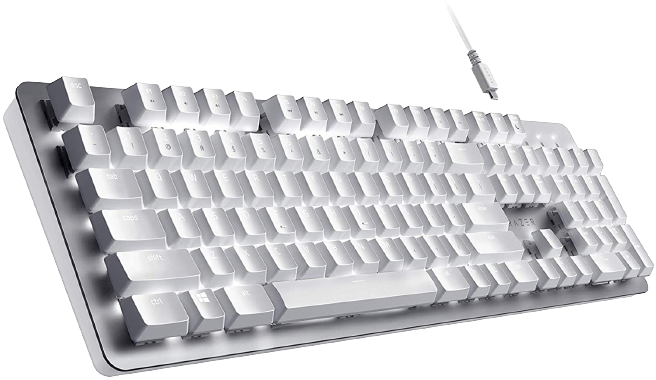
Razer is known for gaming, but the Razer Pro Type keyboard is not for gamers. That's not to say you couldn't use it to play games with, because you could, and you'd have a great time, but that isn't why it exists. In recent times Razer has begun to consider the professional space as well as its traditional core audience, and the Pro Type keyboard is one of the first products with this in mind.

It both does and doesn't look like a traditional Razer keyboard. It's mechanical, with Razer Orange switches, a full-sized layout and a striking white and silver design. It has a fantastic tactile feel while remaining quiet, so your office colleagues won't be irritated by non-stop clacking. It also has a soft-touch finish, further differentiating it as a product designed for comfort and prolonged use through the workday.

Despite the refocused audience, Razer has still managed to bring in some of its gaming-focused features with the Pro Type for the benefit of everyone. The keys are programmable through Razer Synapse 3, just as they are on a gaming keyboard, and you can assign macros, too. It's also one of the best backlit keyboards you will ever see, though limited to white and not RGB.

Over both 2.4GHz wireless and Bluetooth you can connect to as many as four devices, and without the backlight on you can stretch battery life to 84 hours on Bluetooth. Turn the lights on and that goes down. A lot. But you can also just hook up the USB-C cable and use it wired or to top up the battery while you work.

Razer Pro Type

Razer's new Pro Type keyboard brings 2.4GHz or Bluetooth wireless to your PC with a gorgeous white design. But it's those LED backlit keys that really make it catch your eye.

$140 at Razer


5. Microsoft Ergonomic Keyboard: The best ergonomic keyboard for wrist support and comfort

Bottom line: Microsoft has been making ergonomic keyboards for many years and has perfected the craft with its latest model. With large keys, a fixed space bar and an attractive price, it's easily the one to go for if you're hunting this type of keyboard.

Manufacturer Version Vendor
Microsoft Ergonomic Keyboard $50 at Microsoft
Microsoft Ergonomic Keyboard $75 at Best Buy

Pros:

  • Larger keys, more consistent travel
  • Improved layout and modern design
  • Great ergonomics
  • Affordable
  • Plug and play

Cons:

  • No backlit keys
  • Learning curve

The new Microsoft Ergonomic Keyboard (2019) is a natural upgrade to those rocking older models from the company. The pedigree is similar, but it's clear Microsoft has dramatically improved and updated some of the core features of this series. Typing is more comfortable, and the keyboard looks more modern with a cleaner, more straightforward design.

If you already have the Sculpt or Surface ergonomic keyboards, which are also featured in this collection, these keyboards are all a little different. This keyboard is wired and has deeper key travel than both the Sculpt and Surface ergonomic typing platforms. Microsoft nailed it with the ergonomics here, hence the name, and if you frequently find yourself hurting a little after work, this will surely be of some assistance.

For those who never tried an ergonomic keyboard, the new Microsoft Ergonomic may be worth a shot. The price is one of the lowest of this series, making it quite accessible. There is a learning curve, though, and it will take at least a few days of practice to get used to the design. However, as people in comments here will attest, once you go ergonomic, it's tough to go back.

Microsoft Ergonomic Keyboard

Microsoft's Ergonomic Keyboard rocks large keys, better key actuation, fixed spacebar, and dedicated keys for other features.
$50 at Microsoft

$75 at Best Buy


6. SteelSeries Apex Pro: The best keyboard for heavy gaming

Bottom line: Changeable actuation on a key-by-key basis makes the Apex Pro one of the few genuinely customizable gaming keyboards on the market today and sets a new standard. The flexibility it affords you makes it not only a great keyboard to game on, but also one you can use all day for work, too.

Manufacturer Version Vendor
SteelSeries Apex Pro $200 at Best Buy
SteelSeries Apex Pro $200 at Dell

Pros

  • Changeable actuation points
  • Onboard storage
  • Useful OLED display
  • Included wrist rest

Cons

  • Quite expensive

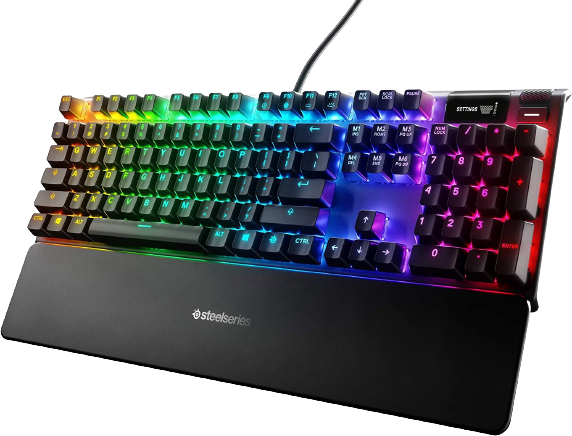
The SteelSeries Apex Pro is simply unlike any other gaming keyboard you can buy right now. Some go the mechanical route, others have started building optical switches based on breaking light beams. SteelSeries has gone for a magnetic actuation that you, the gamer, can change on a key-by-key basis to truly customize your experience to how you like to play games.

The Apex Pro makes it possible to adjust the actuation point between 0.4mm and 3.6mm using the on-board control wheel and OLED display or SteelSeries Engine. The software interacts with the magnetic Omni point switches to adjust how each key performs, and you can set keys to different values that can then be saved to profiles.

This means you can have different profiles for different games, and a mix of instant actuation and, as an example, a heavier actuation on something like a special ability or a grenade to prevent accidental misfires. It's quite pricey, but there's absolutely nothing else on the market like it right now.

SteelSeries Apex Pro
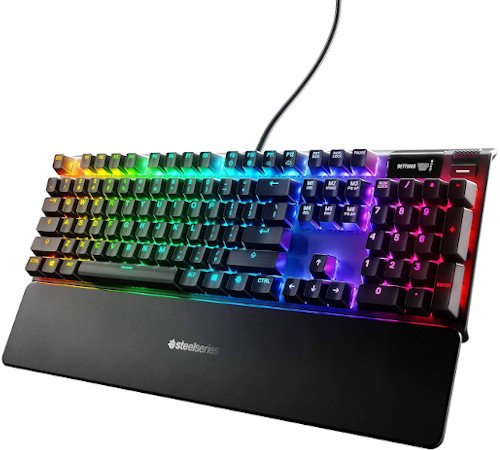
As far as keyboards go there's little out there to compete with the SteelSeries Apex Pro, a truly outstanding gaming keyboard with unparalleled customization.
$200 at Best Buy

$200 at Dell


7. Razer BlackWidow V3 Mini: The best compact keyboard

Bottom line: The Razer BlackWidow V3 Mini is simply staggering, not because of flashy features, but because it's just an exceptionally good, well-put-together keyboard that's a joy to use.

Manufacturer Version Vendor
Razer BlackWidow V3 Mini $180 at Razer

Pros:

  • Choice of Razer Green or Yellow switches
  • Compact and clean design
  • Razer Chroma integration
  • Excellent build quality
  • HyperSpeed wireless

Cons:

  • Pricey
  • RGB lighting decimates battery life

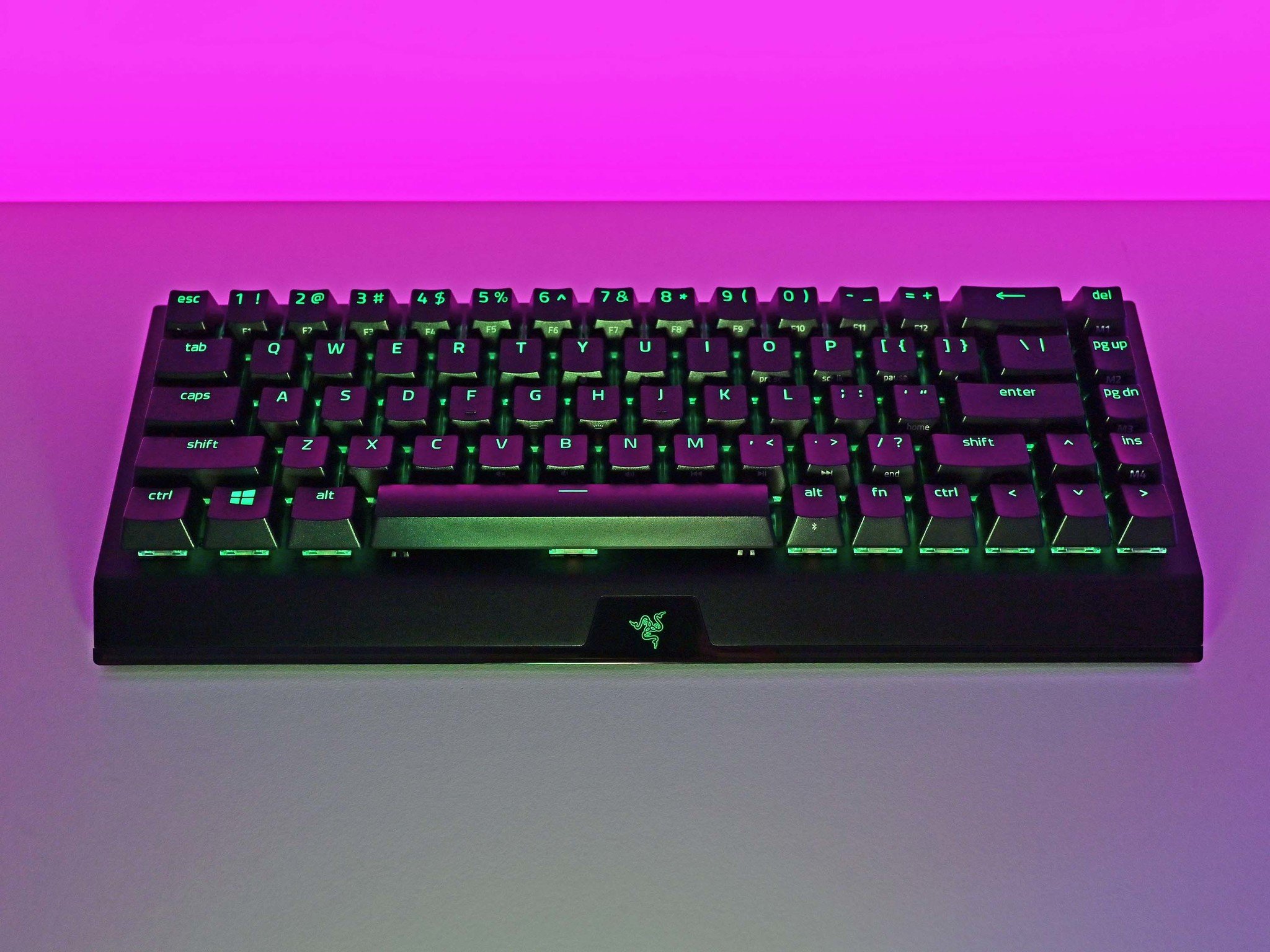
In our review of the Razer BlackWidow V3 Mini, we gave this mechanical keyboard our full five-star rating, as well as a must-buy recommendation. That isn't a statement made lightly, but few keyboards are worthy of such high praise. Razer as a brand has been around for decades and has an almost fanatical following, but you really do get what you pay for. The BlackWidow V3 Mini is a 65% keyboard, so it's super compact, and while gamers are the first thought, in certain configurations this is also the perfect mechanical keyboard for the office.

Razer uses its own Green or Yellow switches in the BlackWidow V3 Mini, depending on whether you prefer tactile feedback or silent actuation. Lots of mechanical switches claim to be silent, but few deliver on the level that the Razer Yellow switches do. The soft, cushioned action and lack of sound make it a dream to spend a day typing on. The keycaps are all of the highest quality, too, and the lack of wobble in any, including the space bar, is reassuring of its quality.

The BlackWidow V3 Mini is mostly plastic, but it's durable feeling with a little weight to it, and certainly doesn't feel cheap or like it might break in any way. It hooks up over USB-C for charging (yes, it's wireless!), and like all good gaming keyboards, has full RGB lighting throughout. Razer Synapse is a brilliant bit of kit for managing the keyboard too, allowing you to set macros, reprogram keys, create profiles, and sync lighting effects.

Razer BlackWidow V3 Mini
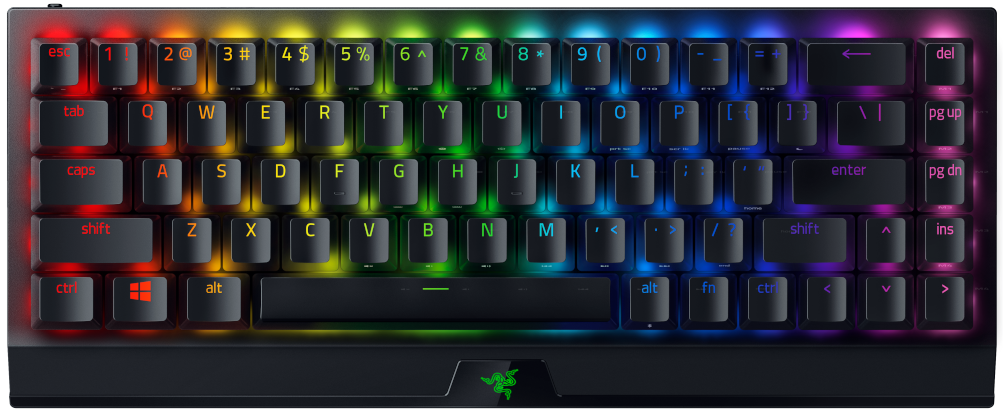
Razer just made the best gaming mechanical keyboard. HyperSpeed wireless, reliable Razer switches, 65% percent design to cut bloat, and excellent ergonomics.

$180 at Razer


8. KLIM Lightning: The best budget keyboard for work and play

Bottom line: This is a brilliant gaming keyboard with exceptional build quality and a crazy low price. What you get far exceeds the price you pay and while it's aimed at gamers, if you get past the styling this is an epic keyboard to use for work, too.

Manufacturer Version Vendor
KLIM Lightning $30 at Amazon

Pros:

  • Amazing build quality
  • Good key travel and feel
  • Individually lit keys
  • No drivers or companion software required
  • Fantastic price

Cons:

  • Styling will split opinions
  • Fans of macro keys can look elsewhere
  • Cable placement with no built-in channeling

It's rare to come across a keyboard that's almost too good to be true, but this one from a brand you've probably never heard of definitely fits the bill. The KLIM Lightning has been around for a couple of years but it's still unbeatable for anyone shopping on a tight budget who wants a great keyboard. The build quality alone of the Lightning makes its asking price seem too low.

As with many of the best keyboards out there today, the primary target is gamers, and the aggressive styling of the KLIM Lightning makes no apologies for that. You may love it, you may hate it, but however you lean, it's constructed like a tank. The frame is entirely metal, and the larger cutout at the top is actually big enough to stand up your smartphone while you work.

This isn't a full mechanical keyboard, instead billing itself as a hybrid. You get good key travel and feel like on a mechanical keyboard without any of the squishy feeling you can get from membrane keys. What you don't get is the loud clacking often associated with mechanical keyboards, and as such, it's a perfect companion for work and play.

You don't need any software to go with it, either, and all of the keys are individually lit. It's not the fancy RGB you might find on something more expensive, but it's subtle and stylish looking, and bright enough to illuminate those late nights working. Or gaming.

KLIM Lightning

This keyboard is as well built as it is wild looking and comes with a quality and feel you just don't normally get in a keyboard this affordable.

$30 at Amazon


What about all the other keyboards?

Even though these are the keyboards we recommend as the best of the best, they're only a snapshot of what's on offer. As you start to drill down and look at more specific use cases and even specific manufacturers, there's a lot out there to consider.

If you're a keen gamer, for example, it's worth looking at all the best gaming keyboards to make sure you're making the right choice for the gaming you want to do. Likewise, if you know you want an ergonomic keyboard that's going to help you look after your wrists, considering all the best ergonomic keyboards is a smart call.


How to choose the right keyboard for your PC

Choosing a new keyboard can be a daunting prospect, after all, there's so much choice. It's hard to know where to start, and while we can recommend what the best out there are, these aren't automatically the best for you. You should first make sure you know what you're looking for in a keyboard before you commit to buying.

As with most things, consider your budget first. There's no point going into keyboard shopping without a price range in mind, because as you can see here, prices vary wildly from under $50 to well over $200. Nailing down a budget will make it easier to dismiss keyboards that aren't right for you before getting to into the weeds with specs and features.

The other primary consideration needs to be what you're going to use it for most. Mechanical keyboards are easily the best feeling, but if you're never going to game is the increased price and the additional noise worth it? Likewise, if you plan to game, you're not going to have a good time with a Bluetooth keyboard with chiclet keys.

From there you can start to consider a few more options. Always remember that the right keyboard for you is out there, waiting for you to find it.

What to look for in a new keyboard

Use this handy checklist to cover the key features you should consider when you're shopping for a new keyboard.

  • Budget
  • Gaming, work or both?
  • Desktop or laptop?
  • Wired or wireless
  • Mechanical or not?
  • Included wrist rest?
  • Battery life on wireless keyboards
  • Do you want media keys?

Credits — The team that worked on this guide

Richard Devine Richard Devine is an Editor at Windows Central. A former Project Manager and long-term tech addict, he joined Mobile Nations in 2011 and has been found on Android Central and iMore as well as Windows Central. Currently, you'll find him covering all manner of PC hardware and gaming.

Rich Edmonds is a staff reviewer at Windows Central, which means he tests out more software and hardware than he cares to remember. Joining Mobile Nations in 2010, you can usually find him inside a PC case tinkering around when not at a screen fighting with Grammarly to use British words. Hit him up on Twitter: @RichEdmonds.


0 comments:

Post a Comment

About

Privacy Policy

ShortNewsWeb

Blog Archive

Categories

10 Hacks Every Student Should Know (1) 10 Shows Like 'A Knight of the Seven Kingdoms' You Should Watch Next (1) 10 Shows Like 'Boots' You Should Watch Next (1) 10 Shows Like 'The Last of Us' You Should Watch Next (1) 11 of the Best Tech Gifts for Teens Still on Sale After Cyber Monday (1) 15 Shows Like 'The Night Manager' You Should Watch Next (1) 21 of the Weirdest Things You Can Bring on an Airplane (1) A Four Pack of These TSA-Approved Luggage SmartLocks Is on Sale $80 Right Now (1) Actually Fake? (1) After 90 Days on a Vibration Plate (1) an Impact Driver (1) and a Hammer Drill (1) and Artists Love It (1) and Here's the Gear That Made My Apartment Into a Video Studio on a Budget (1) and Here's What I Love (and Hate) About Walking Pads (1) and I Can't Recommend the Kindle Colorsoft (1) and I'm Eyeing These AirPods Max on Sale for $120 Off (1) and It’s 30% Off for Memorial Day (1) and It's Half Off for Prime Day (1) and More (1) and Peloton’s Stretching Classes Are a Huge Help (1) and These Are 30% Off for Prime Day (1) and These Are the Top 10 Tech Sales This Week (3) and This Is My Favorite Stair Stepper Workout (1) and You Should Turn It Off (1) Android 16 Is Now Officially Available on These Devices (1) Android 16 Just Put Parental Controls Directly on Your Kid's Phone (1) Android 16's Latest Beta Adds a Long-Awaited Lock Screen Feature (1) Android's Canary Channel Lets You Try New Features Before Anyone Else (1) Apple Has Improved the Powerbeats Pro 2's Heart Rate Issues (but It’s Still Not Enough) (1) Apple Is Working On These Five New Satellite Features for the iPhone (1) Apple Just Added Two More Apple Music Features to iOS 26 (1) Apple's Newest iPhone Charger Is Pricey but Versatile (1) Apple’s Second macOS Tahoe Beta Lets You Test Out New AirPods Features (1) Are ‘Ultra-Processed’ Foods Really That Bad for You? (1) Are Brain Wearables the Future of Fitness Tracking? (1) but I Doubt They'll Be Able to Compete With Whoop's App (1) but My Brain Feels Amazing (1) CES 2026: You Can Chain 100 of These Ikea Bluetooth Speakers Together (1) CES 2026: You Can Finally Use XREAL's AR Glasses With the Nintendo Switch 2 (1) Despite Google's Battery Performance Update (1) Disney Might Pull Its Channels From YouTube TV (1) Disney Movies Are Disappearing From YouTube and Google TV (1) Do You Really Need to Check With a Doctor Before Starting to Exercise? (1) E-Readers (1) Eight Apps I Use to Get a Ton of Free Stuff (1) Every Apple iPad Is on Sale for Labor Day (1) Everything You Need to Know About October Prime Day (1) Four Tools You Can Use to Find Any Leak in Your Home (1) Gmail Is Getting AI-Powered Search and Proofreading Features (1) Google Maps Will Soon Let You Talk to Gemini While Driving (1) Google's AI Mode Can Now Work Like a Virtual Sales Associate (1) Google's August 2025 Update Fixes These Issues With Your Pixel (1) Google’s First Foldable Phone Is Down to $580 for Labor Day (1) Google's Going All In on 'AI Mode' With New Features and a Global Launch (1) Here’s What to Expect From Walmart’s Black Friday and Cyber Monday Sales (1) How Apple Fixed the Photos App in iOS 26 (1) How Cold Is Too Cold to Run Outside? (1) How I Feel After 30 Days With the Hydrow Arc Rower (1) How Insurance Companies Use Drones to Raise Your Rates (and What to Do About It) (1) How to Estimate the Utility Bills for Your New Home (1) How to Set Up Your Own Custom Focus Modes on iPhone (1) How to Sign Up to Test Oura’s New Blood Pressure Feature (1) How to Speak With a Real Person at Target Customer Service (1) How to Turn Off the New ‘Gemini in Chrome’ Button (1) How to Watch Pornhub Even If It's Blocked In Your State (1) I Asked People the Real Reasons They Post Their Workouts Online (1) I Just Got an iPhone (1) I Like Peloton's Mindful 'Reflection Rides' More Than I Thought I Would (1) I Love This Minimalist Smart Lock (1) I Never Leave Home in Winter Without These (Cheap) Heated Gadgets (1) I Swapped My Massage Gun for This Chirp Roller and My Muscles Have Never Felt Better (1) I Tested AI 'Humanizers' to See How Well They Actually Disguise AI Writing (1) I'm a Comics Reader (1) I'm a Deals Writer (3) I'm a Full-Time Creator (1) I’m a Marathon Runner (2) I’m Learning to Do the Splits As an Adult (1) If You Hate Running (1) iOS 26 Will Make Managing Your Battery Life Easier (1) Is Moltbook (1) Millions of Earbuds and Headphones Have a Serious Android Security Vulnerability (1) My 10 Favorite YouTube Channels for At-Home Yoga Classes (1) My Favorite Amazon Deal of the Day: Samsung Galaxy Buds 3 FE + Galaxy SmartTag 2 (1) My Favorite Amazon Deal of the Day: Samsung's 'The Frame' TV (1) My Favorite Amazon Deal of the Day: Shokz OpenRun Headphones (1) My Favorite Amazon Deal of the Day: The 2024 Amazon Kindle Scribe (1) My Favorite Amazon Deal of the Day: The 2024 Kindle (1) My Favorite Amazon Deal of the Day: The 75-Inch Amazon Fire TV Omni QLED (1) My Favorite Amazon Deal of the Day: The 77-inch Sony Bravia A95L OLED TV (1) My Favorite Amazon Deal of the Day: The Nothing CMF Watch 3 Pro (2) My Favorite Amazon Deal of the Day: The Samsung Galaxy S25 FE With a $100 Gift Card (1) My Favorite Amazon Deal of the Day: The Samsung Galaxy Watch 8 (1) My Favorite Amazon Deal of the Day: The Sonos Roam 2 Portable Speaker (1) My Favorite Amazon Deal of the Day: The Soundcore Sleep A20 Earbuds (1) My Favorite Amazon Deal of the Day: These Shokz Bone Conduction Headphones (1) My Favorite Amazon Deal of the Day: This 75-inch Toshiba C350 Smart TV (1) My Favorite Amazon Deal of the Day: This 85-Inch TCL QLED TV (1) My Favorite Amazon Deal of the Day: This Like-New Amazon Kindle Paperwhite (1) My Favorite Underrated Fitness Watch Is Less Than $200 Until Prime Day Ends Tonight (1) My Five Favorite Things I Saw at CES Unveiled 2026 (1) My Legs Feel the Same (1) Nine Useful Power Tools You Probably Didn’t Know Existed (1) NYT Games Subscribers Can Now Make Custom Wordles for Their Friends (1) October Prime Day 2025: Live Updates on the Best Deals for MacBooks (1) OpenAI Is Killing ChatGPT-4o (Again) (1) OpenAI Will Now Operate Like a For-Profit Company (1) Peloton's 'Pace Targets' Workouts May Turn Me Into a Runner (1) Peloton's Nutrition Offerings Are Surprisingly Robust (and Free) (1) Samsung’s Next Galaxy Unpacked Will Reveal Its ‘Ultra’ Foldable (1) Samsung's Ultrawide Odyssey G9 Monitors Are Down to Their Lowest Prices Ever for Labor Day (1) Six New Ways to Customize Your Mac’s Look in macOS Tahoe (1) Six of the Best Indoor Air Quality Monitors for Your Home (1) Six of the Best YouTube Channels for Running Workouts (1) Six Tricks Companies Use to Hide the Impact of Tariffs (1) Smart Glasses (1) Sony Will Soon Let You Pair Your PS5 Controller With Multiple Devices at Once (1) Sony's DualSense PS5 Controllers Are on Sale for Black Friday (1) T-Mobile's App Is Recording Your Screen by Default (1) Target’s ‘Circle Week’ Sale Will Start Before Amazon’s October Prime Day (1) That PayPal 'Automatic Payment Status' Email Is a Scam (1) The 11-Inch M4 iPad Pro Is $500 Off for Prime Day (1) The AirPods 4 Are on Sale for $90 During Labor Day (1) The AirPods 4 Are Still at Their Prime Day Price (1) The Apple Watch SE 2 Is $80 Off Right Now (1) The Apple Watch’s Newest Health Feature Has Been Cleared by the FDA (1) The Beats Studio3 Are Just $89 Right Now (1) The Best Amazon Echo Speaker Is $80 Right Now (1) The Best Deals You Can Get on TVs Before Prime Day Ends Tonight (1) The Best Gifts for DIYers (That Aren't Tools) (1) The Best iPad for Most People Is on Sale for Its Lowest Price Ever (1) The Best Labor Day Tool Deals Under $25 (1) The Best Prime Day Deals on Headphones (1) The Best Sales on Headphones and Earbuds Right Now (1) The Best Study Apps That Make Learning Easier (1) The Bose Ultra Open Earbuds Are $100 Off Right Now (1) The Cheapest Apple Watch Is an Even Better Deal on the Last Day of Prime Day (1) The Difference Between a Drill (1) The Entire 'Planet of the Apes' Franchise Explained in 10 Infographics (1) The Google Pixel Watch 2 Is 20% Off Right Now (1) The Latest M4 MacBook Air Is Down to Its Lowest Price Ever for Labor Day (1) The Les Mills ‘Educational’ Fitness Classes Helped Me Understand Why My Favorite Workouts Work (1) The Meta Quest 3S VR Headset Just Dropped To Its Lowest Price Ever On Amazon (1) The Most Fun Snowball Fight Tech Money Can Buy (1) The PlayStation Portal Is Cheaper Than Ever Ahead of Black Friday (1) The Roku Streaming Stick 4K With HDR Is Half Off Right Now (1) The Samsung Galaxy Z TriFold's Price Is Eye-Watering (1) The Seven Best Tool Box Accessories Everyone Should Have (1) the Social Network for AI Agents (1) The Two Best Streaming Services for Movie Nerds Are Discounted for Black Friday (1) The Utilities Questions No One Thinks to Ask Before Buying a House (1) The XP-Pen Magic Note Pad Is $140 Off for This Early Black Friday Deal (1) The Yamaha Seqtrak Is My Tech ‘Upgrade of the Year’ (1) There's Something Off About Apple's New Sleep Score (1) These Are the Best Flashcard Apps for Studying (1) These Are the Best Labor Day Tech Deals on Amazon (1) These M4-Powered MacBook Pros Are All at Their Lowest Prices Ever Right Now (1) These Premium Earbuds Are Over $100 Right Now (1) This App Switcher for Mac Is Way Faster Than Command-Tab (1) This Is the Best AirPods Pro Deal Ahead of Black Friday (1) This JBL Outdoor Speaker Is $130 Off Ahead of Prime Day (1) This Last-Minute Sale on the Switch 2 Bundle Is Available at Best Buy Today (1) This Orbital Massage Gun Is Now Essential to My Workout Routine (1) This Owala Water Bottle Is My Health Upgrade of the Week (1) This Pixel Still Caught Fire (1) This Popular 55-Inch Hisense TV Is 45% Off Ahead of Prime Day (1) This Quirky Wallet-Sized E-Reader Is Under $50 for Cyber Monday (1) This Ridiculously Detailed Spreadsheet Has Helped Me Stick to My New Year’s Resolutions for Five Years (1) This Rugged Soundcore Bluetooth Speaker Is Nearly 40% Off Right Now (1) This Samsung Ultra-Wide Curved Monitor Is 33% Off Right Now (1) This Sleep Number Bed Has Been Giving Me the Best Rest (1) This Sonos Soundbar Is $150 Off for Black Friday (1) Three Whoop Band Competitors Are Coming (1) Try 'Rucking' (1) Use the SQ3R Method to Study More Effectively (1) Use This App to Add Windows-Style Auto Scrolling to macOS (1) Vine Is Back (1) What It's Like to Race With the Garmin Forerunner 165 (1) What the Netflix/Warner Bros. Merger Could Mean for Streaming (1) What You Should Actually Know About Tylenol and Pregnancy (1) Where to Stream Every Nominated Movie Before the 2026 Oscars (1) Which Apple Announcements to Expect From WWDC 2025 (1) Who Can Get a Piece of Google's $135 Million Android Settlement (1) Why I Always Check the Wet Bulb Temperature Before a Summer Run (1) Why You Need to Update Your Plex Server ASAP (1) Yes (1) You Can Finally Remove Pixel’s Annoying 'At a Glance' Widget (1) You Can Get $150 Off an 11-inch iPad Air for Labor Day (1) You Can Get $350 Off the Galaxy S25 Ultra for Prime Day (1) You Can Get the Apple Watch Ultra 2 at Its Lowest Price Ever During Prime Day (1) You Can Get This Microsoft Surface Laptop SE on Sale for $190 Right Now (1) You Can Now Block Your Kids From Watching YouTube Shorts (1) You Can Now Buy These Massage Guns With Your FSA or HSA (1) You Might Soon Be Able to Change Your Gmail Address (1) You Need Adjustable Dumbbells in Your Life (1) Your iPhone's Camera Comes With a Hidden Translator (1) Your Webcam and Phone Camera Can Be Hacked (1) YouTuber Hank Green’s Focus App Just Overtook ChatGPT on the App Store (1) 'The Woks of Life' Reminded Me to Cook With All the Flavors I Love (1) 10 Scary Podcasts to Listen to in the Dark (1) 11 Ways to Automate Your Life (and Get Back More Free Time) (1) 13 of the Best Spooky Episodes From (Mostly) Un-Spooky Shows (1) 13 Spooky Movies Set on Halloween Night (1) 16 of the Best Ways to Declutter Your Home (1) 1Password Now Generates QR Codes to Share Wifi Passwords (1) 2024 (15) 21 Thanksgiving Movies About Families As Screwed-Up As Yours (1) 30 Movies and TV Shows That Are Basically 'Competence Porn' (1) 30 of the Most Obscenely Patriotic Movies Ever (1) 31 Spooky Movies to Watch Throughout October (1) 38 of the Best Queer Movies of the Past 100 Years (1) 40 Netflix Original Series You Should Watch (1) 55 Box Office Bombs Totally Worth Watching (1) Active Directory (1) Adobe's AI Video Generator Might Be as Good as OpenAI's (1) AIX (1) Amazon Prime Members Can Get Two Free E-Books in May (1) Amazon's Biggest Kindle Is $75 Off Right Now (1) and I'd Do It Again (1) and It's Not Worth the Price Hike (1) and Max Bundle Isn't a Terrible Deal (1) and the Dreo Solaris Is the Best Space Heater I’ve Tried (1) and These Are My Favorite Tech Deals From Walmart’s Black Friday Sale (1) and These Water-Resistant Running Shoes Are a Game Changer (1) and They're All on Sale for Black Friday (1) Apache (2) Apple Finally Made the New AirPods Max Worth Buying (1) Apple Intelligence Is Running Late (1) Apple Intelligence's Instructions Reveal How Apple Is Directing Its New AI (1) Apple Passwords Is Now on Firefox (but Not for Windows Users) (1) Apple's Latest Update Might Have Opted You Back Into Apple Intelligence (1) Apple’s Password Manager Had a Major Security Flaw (1) August 18 (1) August 4 (1) August 5 (1) Avoid an Allergic Reaction by Testing Your Halloween Makeup Now (1) Backup & Restore (2) best practices (1) bleepingcomputer (249) Blink Security Cameras Are up to 68% Off Ahead of Prime Day (1) Bluesky Has Trending Topics Now (But You Can Disable Them) (1) CentOS (1) CES 2025: Asus' Zenbook A14 Is the Lightweight Laptop My Back Wishes I Had (1) CES 2025: Govee’s New Pixel Light Will Remind You of a Lite Brite (1) ChatGPT Now Has a 'Library' of Your AI-Generated Images (1) Configure PowerPath on Solaris (1) Congress Might Ban DeepSeek (1) Documents (2) Don't Buy the New iPad Air (1) Don't Fall for This 'New' Google AI Scam (1) Don't Rely on a 'Monte Carlo' Retirement Analysis (1) Eight Cleaning Products TikTok Absolutely Loves (1) Eight Landscaping Features That Can Lower the Summer Heat in Your Yard (1) Eight of the Best Methods for Studying so You Actually Retain the Information (1) Eight Unexpected Ways a Restaurant Can Mislead You (1) Elevate Your Boring Store-Bought Pretzels With This Simple Seasoning Technique (1) Even Grok AI Can 'See' Now (1) Even Steam Has Malware Now (1) Everything Announced at Apple's iPhone 16 Event (1) Everything I'm Seeding in February (1) file system (6) Finally (1) Find (1) Find a Nearby ‘Gleaning Market’ to Save Money on Groceries (1) Five Red Flags to Look for in Any Restaurant (1) Five Ways to Keep Your Neighbors From Looking Down Into Your Yard (1) Five Ways You Can Lose Your Social Security Benefits (1) Flappy Bird's Creator Has Nothing to Do With Its 'Remake' (1) For Years (1) Four Reasons to Walk Out of a Job Interview (1) Four Signs Thieves Are Casing Your House (1) gaming (1) Gboard for Android Finally Gets Undo (1) Goldfish Crackers Have a New Name (for a Little While) (1) Google Might Be Removing the 'I'm Feeling Lucky' Button (1) Grok Is Now Available Without an X Account (1) Hackers Now Have Access to 10 Billion Stolen Passwords (1) Hackers Stole Health Records From 1.6 Million Planned Parenthood Patients (1) Here’s Everything You Get With Garmin’s New Connect+ Subscription (1) Here's What's New in the Latest Nintendo Switch Update (1) Here’s Why (and When) Gemini Is Replacing Google Assistant (1) How I Finally Organized My Closet With a Digital Inventory System (1) How I Pack Up a Hotel Room So I Don’t Forget Anything (1) How Opening Multiple Bank Accounts Helped Me Manage My Money Better (1) How to Buy Residency in Another Country With a 'Golden Visa' (1) How to Cancel Your Amazon Prime Membership After Prime Day Is Over (1) How to Choose the Best Weightlifting Straps for Your Workout (1) How to Do Fartlek Runs (and Seven Different Kinds to Try) (1) How to Enable (and Turn Off) Apple Intelligence on an iPhone (1) How to Get Free Car Maintenance and Repair Work (1) How to Get Started With Bluesky (1) How to Keep Squirrels Off Your Bird Feeders (1) How to Mute Words and Phrases on Your Bluesky Feed (1) How to Protect Your Kids From Identity Theft (1) How to Remotely Control Another iPhone or Mac Using FaceTime (1) How to Set Up Your Bedroom Like a Hotel Room (and Why You Should) (1) How to Speak With a Real Person at Target Customer Service (1) How to Stock a 'Tariff Pantry' (1) How to Take a Screenshot on a Mac (1) How to Take Full Control of Your Notifications on a Chromebook (1) How to Track When Nintendo Switch 2 Preorders Are Back in Stock (1) How to Track Your 2024 Federal Tax Refund (1) How to Use Lighting to Improve Your Home's Sale Price (1) How to Use Picture-in-Picture Mode on an Android Phone (1) How to Write SMART Goals That Actually Help You Reach Your Fitness Dreams (1) Hulu (1) I Chose the Beats Fit Pro Over the AirPods Pro (1) I Tested Grok 3 (1) I'd Recommend These Seven Outdoor Security Cameras I've Tested (1) I'm a Runner (1) I'm a Shopping Writer (1) I’m Always Cold (1) If You Got a Package You Didn't Order (1) If You Hate Running (1) If You Want Lossless Audio on Your AirPods Max (1) Important Questions (17) Instagram Is Using AI to Automatically Enroll Minors Into 'Teen Accounts' (1) Install and Configure PowerPath (1) interview questions for linux (2) Is ‘Ultra-Processed’ Food Really That Bad for You? (1) Is Amazon Prime Really Worth It? (1) It Might Be a Scam (1) It's Surprisingly Easy to Customize Your Mac's Folder Icons (1) July 14 (1) July 21 (1) July 28 (1) July 7 (1) June 30 (1) Lifehacker (70) LifeHacker (369) Linux (36) Make and Freeze Some Roux Now for Easy Turkey Gravy (1) Meredith's Training Diaries: How I Crushed My Marathon Personal Record (1) Meta Releases Largest Open-Source AI Model Yet (1) Monitoring (3) music (688) My Favorite 14TB Hard Drive Is 25% Off Right Now (1) My Favorite Amazon Deal of the Day: Apple AirPods Max (2) My Favorite Amazon Deal of the Day: Apple Pencil Pro (1) My Favorite Amazon Deal of the Day: Galaxy S25 Edge Preorders (1) My Favorite Amazon Deal of the Day: Google Nest Mesh WiFi Router (1) My Favorite Amazon Deal of the Day: Google Pixel 8 (1) My Favorite Amazon Deal of the Day: PlayStation 5 (1) My Favorite Amazon Deal of the Day: Samsung Odyssey G9 Gaming Monitor (1) My Favorite Amazon Deal of the Day: SHOKZ OpenMove Bone Conduction Headphones (1) My Favorite Amazon Deal of the Day: The 13-Inch M3 Apple MacBook Air (1) My Favorite Amazon Deal of the Day: The Beats Pill Portable Speaker (1) My Favorite Amazon Deal of the Day: The Garmin Forerunner 955 (1) My Favorite Amazon Deal of the Day: The Garmin Venu 3S (1) My Favorite Amazon Deal of the Day: The Google Nest Learning Thermostat (1) My Favorite Amazon Deal of the Day: The Google Pixel 9 Pro (1) My Favorite Amazon Deal of the Day: The Google TV Streamer 4K (1) My Favorite Amazon Deal of the Day: The Kindle Colorsoft Signature Edition (1) My Favorite Amazon Deal of the Day: The M4 MacBook Air (1) My Favorite Amazon Deal of the Day: The Microsoft Surface Pro (1) My Favorite Amazon Deal of the Day: The Samsung Galaxy Buds 3 Pro (1) My Favorite Amazon Deal of the Day: The Sonos Era 100 (1) My Favorite Amazon Deal of the Day: These Bose QuietComfort Headphones (1) My Favorite Amazon Deal of the Day: This Meta Quest 3S Bundle (1) My Favorite Bone-Conduction Headphones Just Dropped to Their Lowest Price (1) My Favorite Fitness Watch Is Getting Walking Workouts and a Smart Alarm (1) My Favorite Tools for Managing Cords and Cables (1) Nagios (2) Netflix Is Changing Its TV App Design (1) Newtorking (1) NFS (1) Now Is a Good Time to Buy a Refurbished M-Series MacBook (1) OMG! Ubuntu! (688) OpenAI Just Introduced More Ways to Use ChatGPT on WhatsApp (1) Opera’s New Browser Is Built to Break Your Doomscrolling Habit (1) Oracle Linux (1) oracleasm (3) osnews (63) Oura’s Readiness Score Finally Takes Menstrual Cycles Into Account (1) Password less communication (1) Patching (2) Pixel Studio Is the Easiest (If Not the Best) Way to Make AI Art on Your Pixel 9 (1) Poaching Is the Secret to Perfect Corn on the Cob (1) powerpath (1) Prioritize Your To-Do List By Imagining Rocks in a Jar (1) Red Hat Exam (1) Redo Buttons (1) register (261) Rsync (1) Safari’s ‘Distraction Control’ Will Help You Banish (Some) Pop Ups (1) Samba (1) Samsung Just Announced the Galaxy S25 Series (1) Save Time and Air Fry Your Pumpkin Pie (1) Scrcpy (1) Sending an Emoji in Google Messages Will Now Play a Fun Animation (1) September 1 (1) September 15 (1) September 2 (1) September 22 (1) September 23 (1) September 30 (1) September 8 (1) Seven Home 'Upgrades' That Aren’t Worth the Money (1) Seven Popular Home Renovations That Will Increase Your Property Taxes (1) Seven Things Your Credit Card’s Trip Protection Won’t Actually Cover (1) Seven Ways to Make Your Home's Entryway More Secure (1) Six Items That Will Maximize Your Carry-On Space (1) Six of the Most Common Tax Myths in 2025 (1) Six Signs Your Bank Is About to Fail (and What to Do About It) (1) Six Unexpected Household Uses for Dry-Erase Markers (1) Six Ways to Prevent a Contractor From Damaging Your House During a Renovation (1) ssh (1) Stop Your iPhone From Sharing Photos' Data With Apple (1) Swift Shift Is the Window Management Tool Apple Should Have Built (1) System hardening (1) Tailor Your iPhone's Fitness Summary to Your Workouts (1) Target’s ‘Circle Week’ Sale Is Still Going After October Prime Day (1) Target’s Answer to Prime Day Starts July 7 (1) Tech (9687) Tech CENTRAL (124) Technical stories (392) technpina (25) The 30 Best Movies of the 2020s so Far (and Where to Watch Them) (1) The 30 Best Sports Movies You Can Stream Right Now (1) The Apple Watch SE (2nd Gen) Is 27% Off Right Now (1) The Beats Solo 4 Are 50% Off Right Now (1) The Best Deals on Robot Vacuums for Amazon’s Early Prime Day Sale (2) The Best Deals on Ryobi Tools During Home Depot's Labor Day Sale (1) The Best Early Prime Day Sales on Power Tools (1) The Best Last-Minute Mother’s Day Gifts for Moms Who Like to Cook (1) The Best Last-Minute Valentine's Day Gift Ideas for Under $30 (1) The Best Movies and TV Shows to Watch on Netflix This Month (1) The Best October Prime Day Deals If You Are Experiencing Overwhelming Existential Dread (1) The Best Places to Go When You Don't Want to Be Around Kids (1) The Best Places to Order Thanksgiving Dinner to Go (1) The Best Strategies for Lowering Your Credit Card Interest Rate (1) The Best Way to Clean a Microwave (1) The Best Ways to Prevent Countertop Appliances From Damaging Your Kitchen (1) The Best Ways to Store All Your Bags and Purses (1) The Boox Note Air 4C Is a Color E-Reader and Digital Notebook in One (1) The Easiest Way to Free Up Disk Space on Your Mac (1) The Latest watchOS Beta Is Breaking Apple Watches (1) The Marshall Emberton II Speakers Are $70 Off for Black Friday (1) The New Disney+ (1) The Ninja Crispi Is Changing How I Make Party Dips (1) The PowerSchool Breach May Have Compromised Over 70 Million Users' Data (1) The Real Cost of Using a Nespresso Machine (1) The Samsung Galaxy Buds 3 Pro Are $60 Off for Black Friday (1) The Two Best Times of Year to Look for a New Job (1) the X Rival Everyone's Flocking To (1) There's a Fix for Apple Mail's Weird Archiving Behavior (1) These Anker Soundcore Sport X10 Earbuds Are Cheaper Than Ever (1) These Bissell Vacuums Are on Sale Ahead of Black Friday (and They're All Great) (1) These Dutch Ovens Are Less Than $70 Right Now (Including My Favorite One) (1) These Googly Eyes Will Help You Find Your Mac's Cursor (1) These Meatball Shots Are My Favorite Football Season Snack (1) These Milwaukee Tools Are up to 69% off Right Now (1) These Tech Products Are More Than Half Off During Amazon's Big Spring Sale (1) This 2024 Sony Bravia Mini-LED TV Is $400 Off Right Now (1) This 75-Inch Hisense ULED 4K TV Is $500 Off Right Now (1) This App Lets You Create Automations Your Mac Usually Doesn’t Support (1) This Google Nest Pro Is 30% Off for Prime Day (1) This Ikarao Portable Karaoke Machine Is More Than $100 Off (1) This iPhone and Mac App Lets You Edit Your Bluesky Posts (1) This MagSafe-Compatible Power Bank Is 40% Off for Black Friday (1) This Peanut Butter Latte Isn’t As Weird As It Sounds (1) This Safari Extension Gives You More Control Over Your Reddit Feed (1) This Tech Brand Will Get the Biggest Discounts During Prime Day (1) This TikTok Upholstery Cleaning Hack Actually Works (1) Three New Things We Know About the Nintendo Switch 2 (1) Three Quick Ways to Shorten a Necklace (1) Three Services People Don't Know They Can Get From Their Bank for Free (1) TikTok's '5x5' Cleaning Method Is Great If You're Short on Time (1) Today’s Wordle Hints (and Answer) for Monday (4) Today’s Wordle Hints (and Answer) for Sunday (11) Try 'Pile Cleaning' When Your Mess Is Overwhelming (1) Try 'Pomodoro 2.0' to Focus on Deep Work (1) Try 'Rucking' (1) Ubuntu News (361) Ubuntu! (1) Unix (1) Use the ‘Organizational Triangle’ to Keep Your House Neater (1) Use This App to Sync Apple Reminders With Your iPhone Calendar (1) Use This Extension to Find All Your X Followers on Bluesky (1) Use This Shortcut to Remove AI From Google Photos Search (1) Use TikTok's 'Rage Cleaning' Trend to Get Your Place Spotless (1) veritas (2) Videos (1) Warner Bros. Is Uploading Classic Movies to YouTube for Free (1) Was ChatGPT Really Starting Conversations With Users? (1) Watch Out for These Red Flags in a Realtor Contract (1) Wayfair Is Having a '72-Hour Closeout' Sale to Compete With Prime Day (1) We Now Know When Google Will Roll Out Android 15 (1) What Is a Healthy Resting Heart Rate? (1) What Is the 'Die With Zero' Movement (and Is It Right for You)? (1) What Not to Do When Training for a Marathon (1) What to Do When Your Employer Shifts Your Pay From Salary to Hourly (1) What to Look for (and Avoid) When Selecting a Pumpkin (1) What to Wear to Run in the Cold (1) What You Should Hoard Before Tariff Price Increases Kick In (1) What's New on Max in December 2024 (1) What's New on Netflix in March 2025 (1) What's New on Prime Video and Freevee in September 2024 (1) Where to Stream Every Nominated Movie Before the 2025 Oscars (1) Why Now Is the Best Time to Find Running Shoes on Sale (1) Why the Apple TV App Is Better on Android Than iPhone (1) Why You Can't Subscribe to Disney+ and Hulu Through Apple Anymore (1) Why You Might Want to Avoid the Latest Chromecast Update (1) Why You Need Cycling Shoes to Ride a Spin Bike (and How to Pick Some Out) (1) Why Your Home Gym Needs Adjustable Kettlebells (1) Windows (5) You Can Easily Add Words to Your Mac's Dictionary (1) You Can Fight (and Avoid) Your Landlord's Cleaning Fees (1) You Can Get 'World War Z' on Sale for $19 Right Now (1) You Can Get a Membership to BJ's for Practically Free Right Now (1) You Can Get Beats Studio Buds+ on Sale for $100 Right Now (1) You Can Get Microsoft Visio 2021 Pro on Sale for $20 Right Now (1) You Can Get This 12-Port USB-C Hub on Sale for $90 Right Now (1) You Can Get This Roomba E5 Robot Vacuum on Sale for $170 Right Now (1) You Can Hire Your Own Personal HR Department (1) You Can Now Make Google Messages Blur NSFW Images (1) You Can Search Through Your ChatGPT Conversation History Now (1) You Can Set Different Scrolling Directions for Your Mac’s Mouse and Trackpad (1) You Don't Need to Panic Over the Latest Steam 'Leak' (1) You Need Beneficiaries for More Accounts Than You Think (1) You’re Probably Going to Need Another Dongle (1) Your DeepSeek Chats May Have Been Exposed Online (1) Your Verizon Bill Just Got a Little More Expensive (1)

Recent Comments

Popular Posts

Translate

My Blog List

Popular

System Admin Share

Total Pageviews