


 Monday, July 27, 2020


If you care about speed and reliability on your home network, Ethernet has long been the answer. And if you're stuck working from home, the upgrade to Wi-Fi 6 can bring the capabilities we're used to seeing in wired networks to your entire home. Also known as 802.11ax Wi-Fi, Wi-fi 6 brings not only speed improvements but increased bandwidth and traffic management features to improve wireless connections compared to Wi-Fi 5 or 802.11ac. If you are ready to make this jump to new tech, the Netgear Nighthawk RAX50 provides the best overall experience. This router has plenty of speed, excellent coverage, and a price that's quite competitive.
Best Overall: Netgear Nighthawk RAX50
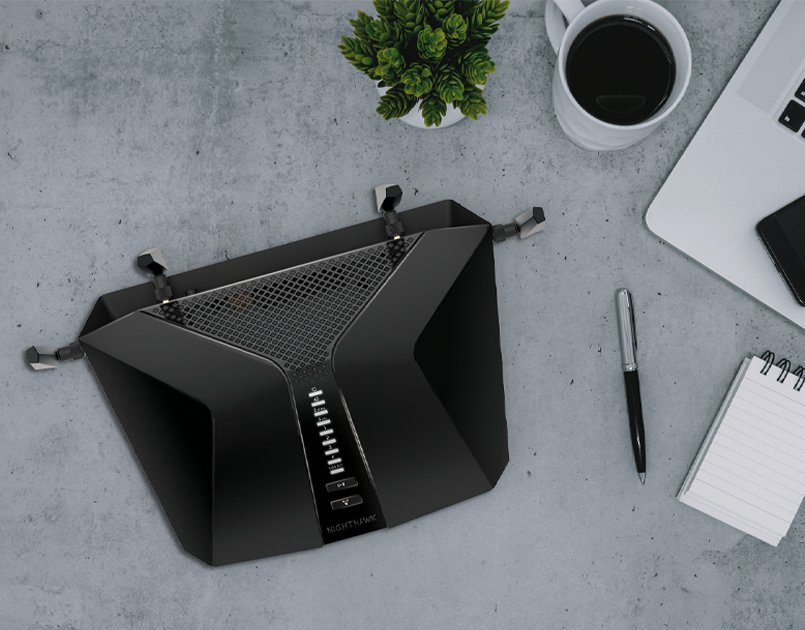
The Netgear Nighthawk RAX50 is an extremely practical high-speed Wi-Fi 6 router with a dual-band setup capable of AX5400 speeds. 600Mbps is provided by the 2.4GHz band while the majority of the speed is delivered thanks to a wide 160MHz 5GHz capable of pushing out 4800Mbps. The majority of users won't be able to make good use of a more expensive tri-and router making the Nighthawk RAX50 a great value.
Four Ethernet ports are available so you can hook up all of your wired devices without needing an extra switch. You also get a USB 3.0 port around the back flanked by two of the four total external antennas. WPA 3 security helps keep your local connections secure, and the optional Netgear Armor service adds in even more security features, including anti-virus protection from Bitdefender.
As with any Wi-Fi 6 router, you can still get your 802.11ac and older Wi-Fi devices connected with great speeds with room for improved connectivity as you upgrade your equipment.
Pros:
- Fast AX5400 speeds
- Wide 160MHz 5GHz band
- 4 Ethernet ports and USB 3.0
- Easy management with Netgear app
Cons:
- Expensive
Best Overall
Netgear Nighthawk RAX50

Plenty of speed for streaming and gaming
The Nighthawk RAX50 has more than enough speed for most users with the capacity for gaming and streaming without dropping speed.
Best Value: TP-Link Archer AX1500
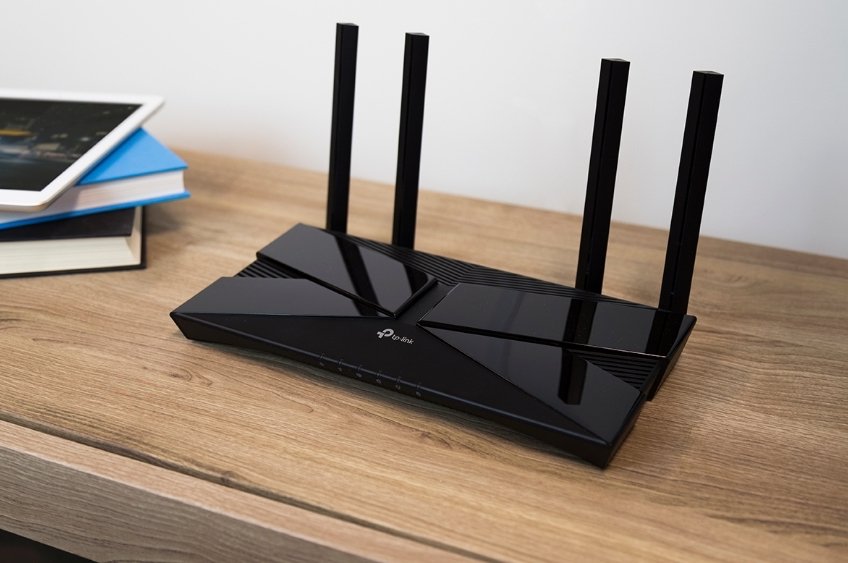
TP-Link's Archer AX1500 delivers Wi-Fi connectivity and reliable speeds for a great price. While AX1500 isn't going to hold up for a fiber gigabit connection, for many people, it's plenty. There's more to Wi-Fi 6 than the pure speed with the Archer AX1500 bringing improvements like OFDMA and MU-MIMO. Speeds max out at 1201Mbps at 5GHz and 300Mbps at 2.4GHz.
Four gigabit Ethernet ports on the back are flanked by four external antennas. The router's housing is 10.2 inches across and 5.3 inches deep, so this router isn't precisely compact when compared to some other routers of the same speed. If you're looking to add Wi-Fi 6 as cheaply as possible, the AX1500 is an excellent option.
Pros:
- Wi-Fi 6 capacity
- AX1500 speeds are enough for many people
- 4 Ethernet ports
Cons:
- Large size
- Not much speed improvement over Wi-Fi 5
Best Value
TP-Link Archer AX1500

Wi-Fi 6 for everyday use
TP-Link makes Wi-Fi 6 features like OFDMA and MU-MIMO as affordable as possible with adequate speed with the Archer AX1500.
Best expandability: Linksys MAX-STREAM MR7350

The Linksys MAX-STREAM MR7350 looks like a standard router, but it has a lot of great features. It offers a solid AX1800 wireless setup with 574Mbps at 2.4GHz and 1201Mbps at 5GHz. This speed is enough for any standard browsing and even 4K video streaming. Four Ethernet ports on the back make it easy to hook up your wired devices.
This router's biggest trick comes with Linksys Velop support. Velop is Linksys' mesh Wi-Fi brand, and the MR7350 can link up with any Velop router. This is great if you need to add some extra Wi-Fi coverage to your home but don't want to upgrade your base router. It's also an excellent way to start a mesh network without giving up the familiarity of a standard router. There are two reasonably large antennas on the back, but this basic design shouldn't stand out too much in your home.
Pros:
- Linksys Velop expandible
- 4 Ethernet ports
- Low price for mesh support
Cons:
- AX1800 lacking compared to other Wi-Fi 6 routers
Best expandability
Linksys MAX-STREAM MR7350

Wi-Fi 6 with mesh capabilities
The Linksys MR7350 delivers AX1800 speeds with four Ethernet ports. You can easily expand coverage with Velop compatibility.
Best starter mesh: Netgear Nighthawk MK62

Quite a lot of people don't have gigabit Ethernet connections and won't be setting up an SSD-based storage server. These people can still benefit from the increased capacity and consistency that is available with Wi-Fi 6 with great coverage thanks to a mesh system. The Netgear Nighthawk MK62 comes in a small housing and can deliver speeds up to AX1800.
You only get a single Ethernet port on either node making this system better for people that have gone mostly wireless with their home network. If you are looking for the convenience of a mesh with the added features of Wi-Fi 6, the MK62 can be a great option with enough speed for most people that doesn't break the bank.
Pros:
- Compact size
- Expandable coverage
- 3,000 square feet of coverage
Cons:
- Only AX1800 speed
- Only 1 Ethernet per unit
Best starter mesh
Netgear Nighthawk MK62

Build your mesh with Wi-Fi 6
The Nighthawk MK62 brings Orbi-like mesh support in a compact black housing with plenty of enough speed for standard browsing.
Best fast mesh: Asus ZenWiFi XT8

Asus was one of the first companies to make a mesh capable Wi-Fi 6 system. It continues that legacy with the purpose-designed ZenWiFi XT8. It comes in a compact housing around six inches wide and tall and just shy of three inches deep and is available in white or charcoal color. It also works with other Asus routers that support its AiMesh software, which is most of them but will be best with other Wi-Fi 6 capable routers.
The ZenWiFi XT8 also doesn't give up much in speed with a fast AX6600 tri-band connection and 3 Ethernet ports per unit. It can also accept a 2.5Gbps input making it a great way to add Wi-Fi to a fast wired connection. With two nodes, you can cover up to 5,500 square feet with the ability to easily expand it later.
Pros:
- Fast AX6600 speeds
- 5,500 square feet of coverage
- 2.5Gbps WAN
- Expand with AiMesh
Cons:
- Only 3 Ethernet ports per unit
Best fast mesh
Asus ZenWiFi XT8

Mesh functionality with a speed boost
Cover up to 5,500 square feet with two units at fast AX6600 speeds. It has a 2.5Gbps input and three open Ethernet ports.
Fast wired option: TP-Link Archer AX6000

TP-Link's Archer AX6000 is one of the few Wi-Fi 6 routers to pack in eight Ethernet ports. This means you keep your wired devices connected without adding another switch making your network setup more straightforward. Besides that, it can accept a 2.5Gbps input allowing it to keep pace with several devices asking for top download speeds while most internet connection max out around 1Gbps; this can still be an excellent addition to a network with a fast storage server.
It's rather significant with eight thick antennas folding up from the center. It also is somewhat thicker than many routers to accommodate the two rows of four Ethernet ports. It has dual USB ports for easy storage expansion, with one of them being USB Type-C. This is a router that will work for nearly any home network but will be larger than necessary for someone that only needs a couple of wired connections.
Pros:
- Fast AX6000 speeds
- 2 USB ports (1 USB Type-C)
- 8 Ethernet ports
Cons:
- Only dual-band
Fast wired option
TP-Link Archer AX6000

2.5Gbps input and 8 Ethernet ports
TP-Link Archer AX6000 offers eight wired ports, as well as fast Wi-Fi 6. Making it an excellent choice for large home networks.
Best Gaming: Asus ROG Rapture GT-AX11000

For the most part, computer accessories wearing a gaming badge are just cheaper accessories with a few lights glued on. With the Asus ROG Rapture GT-AX11000, you get a bit more than that. While RGB lighting is a bit cliché, the lighting on this router works with Asus' Aura RGB, which means it can synchronize with your Aura RGB gear to build Twitch-ready shrine to gaming.
Beyond the aesthetics, you get a fast 2.5Gbps WAN port, which can come in handy with a storage server or even just to be ready for faster network cards in the future. Built-in software can keep your gaming connection optimized to prioritize low ping times, even when there are multiple other active connections.
The ROG Rapture GT-AX11000 has an expressive design with eight large antennas that will stand out. If you like the gaming aesthetic, this router can be an excellent fit for your home.
Pros:
- Fast AX11000 speeds
- 4 Ethernet ports
- 2.5Gbps WAN
- ROG QoS software
Cons:
- Large size
Best Gaming
Asus ROG Rapture GT-AX11000

Great software keeps ping times low
Fast AX11000 Wi-Fi, a 2.5Gbps input, and great software keep your speeds high and pings, whether you game wired or wireless.
Bottom line
Wi-Fi 5 speeds really are enough for what most people need to accomplish on their internet connection. The Wi-Fi 6 upgrade is mostly for future products and uses that haven't fully been realized yet. As 4K streaming and remote connections become more common, the need for a faster and more reliable connection will follow. Wi-Fi 6 will also be able to deal with the dozens of devices we need to get online in our smart homes.
With the Netgear Nighthawk RAX50, you get more than enough speed for standard usage, including multiple 4K streams and gaming. With the wealth of new options available, if you're ready to upgrade your wireless router, it's time to go with Wi-Fi 6.
Credits — The team that worked on this guide

Samuel Contreras When Samuel is not writing about networking and carriers, he spends most of his time researching computer components and obsessing over what CPU goes into the ultimate Windows 98 computer. It's the Pentium 3.





0 comments:
Post a Comment